
WordPress 7.1 is out, and this one is called Mary Lou. Every WordPress release is named after a musician, and 7.1 is named after Mary Lou Williams, the jazz pianist and composer who kept reinventing her sound across five decades. The name fits, because this release is about giving you more control over how your site looks and how you work on it. Here is a plain English look at what changed in wordpress 7.1, and what actually matters if you run a site.
Why is it called Mary Lou?
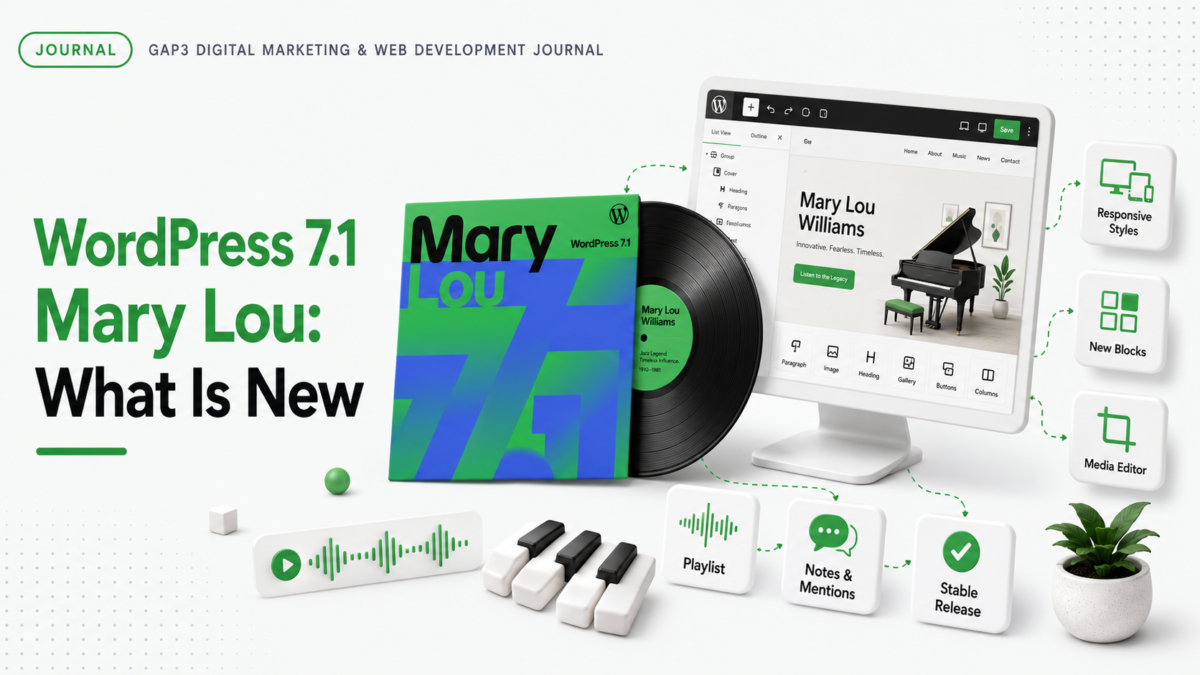
WordPress names each release after an artist who shaped music. Mary Lou Williams started playing in public at six and went on to influence swing, bebop and sacred jazz. In the 1940s she turned her Harlem apartment into a nightly workshop where players like Thelonious Monk and Dizzy Gillespie came to trade ideas. That mix of reinvention and working together is the spirit the team put into this release. If you saw the green and blue cover art with the vinyl record, that is the nod to her.
Responsive styling without custom CSS
This is the change most site owners will feel first. WordPress 7.1 lets you set how a block looks at different screen sizes straight from Global Styles or a block’s own settings, with no custom CSS. You can also preview your layout at different screen widths while you edit. In plain terms, making your site look right on phones and tablets no longer needs code or a workaround. If you have ever paid a developer to patch mobile spacing, this one is a real time saver.
The admin bar follows you everywhere
The admin bar now stays with you as you move between the different editors, so you always know where you are and the tools you use are within reach. It is a small change, but it makes the whole admin feel more consistent, especially if you switch between writing posts and editing your site design.
A new media editor
Image editing now happens in one dedicated window. The familiar Crop button still gets you there, but you also get freeform and aspect ratio cropping, flipping, precise rotation and metadata editing in the same place. It is a cleaner way to handle images without leaving WordPress or opening a separate app.
Notes now do rich text and mentions
If your team reviews content together, this one is useful. Notes now support bold, italic, links and mentions. You can leave a note on a specific piece of text rather than a whole block, keep more than one thread going on the same block, and tag a teammate by typing the at sign so they get notified. It is built for the back and forth of reviewing a page before it goes live.
Two new blocks, Playlist and Tabs
WordPress 7.1 adds two blocks. Playlist brings several audio tracks together in one player, with an optional waveform, which is a fitting touch for a release named after a jazz pianist. Tabs let you group related content into tabbed panels instead of showing everything at once, which keeps a busy page tidy. Developers also get a new way to add their own icon sets, and Button blocks can now have separate styles for hover, focus and active states.
Faster media and better performance
A lot of the heavy lifting for images now happens in your browser instead of on the server. Compression, resizing and thumbnails are handled before the file is uploaded, which means smaller files and fewer memory or timeout errors on large uploads. WordPress 7.1 also reads modern image formats like AVIF and HEIC, can turn GIFs into smaller video files, and the Media Library now scrolls continuously by default. For most sites this simply means a smoother, faster media experience. Smaller images are only one part of speed, and our guide to building a fast WordPress website covers the rest.
What developers get
For the technically minded, there is plenty under the hood. The SVG Icon API is now public, so developers can register their own icons across the editor. The Abilities API makes it easier to build automation and AI tools on top of WordPress. There is a new Design System for theming admin screens, and theme authors get responsive and state based styling through theme.json. The post editor is also fully iframed now, which makes responsive layouts behave more predictably while you build.
Should you update to WordPress 7.1?
For most sites, yes, but do it safely. Back up your site first, and if it is a business site, test the update on a staging copy before you push it live. Updates are usually smooth, but a plugin or a custom theme can occasionally clash with a new version, and it is far cheaper to catch that on staging than on your live site. Like every release, wordpress 7.1 was built by the community, more than 800 contributors this time, which is part of why it lands as a stable update.
Our take. The headline features are nice, but the responsive styling is the one that quietly saves the most time and money. A lot of what used to need a developer and some CSS is now built in, which is good for everyone.
Need a hand with your WordPress site?
If you would rather have someone test the update, fix anything that breaks, or build something new on the latest version, you can hire a WordPress developer to do it. Tell us what you need and we will map it on a free call, then send a fixed quote before any work starts.
Frequently asked questions
Is WordPress 7.1 safe to update to?
Yes, for most sites. Back up first, and test on a staging copy if it is a business site, since a plugin or custom theme can occasionally clash with a new version.
How do I update to WordPress 7.1?
Go to Dashboard, then Updates, and run the update there, or download it from WordPress.org. Back up your site first, and update your plugins and theme at the same time so everything stays in step.
Should I back up my site before updating to WordPress 7.1?
Yes, always. A full backup of your files and database means you can restore in minutes if anything goes wrong. Most hosts and backup plugins can do this in a couple of clicks.
Will WordPress 7.1 break my site?
Usually not. Core updates are tested heavily before release. The risk comes from an old plugin or a custom theme that has not kept up, which is why a staging test is worth it on a business site.
Do I need a developer to update to WordPress 7.1?
A small site can update after a backup. For a business site with plugins and custom code, it is safer to have a developer test it on staging first and fix anything that clashes.
Can I roll back if WordPress 7.1 causes a problem?
Yes. Restore your backup, or use a rollback plugin to move to the previous version. This is exactly why you take a backup before you update.
Will my plugins still work after updating to WordPress 7.1?
Most will. Update your plugins alongside WordPress so they are built for the new version, and test the important ones, especially anything to do with checkout, forms or bookings.
Does WordPress 7.1 work with page builders like Elementor?
In most cases yes, but builders and their add ons sometimes need their own update to match a new WordPress version. Check for updates and test on staging before you update a live site built with a page builder.
Do I have to update to WordPress 7.1 straight away?
There is no need to rush on the day it lands. It is still worth updating soon, both for the new features and for the security and bug fixes that come with any release.
What is the biggest change in WordPress 7.1?
The responsive styling controls. You can now set how a block looks on different screen sizes without any custom CSS, and preview it as you edit.
Can I make my site responsive in WordPress 7.1 without custom CSS?
Yes. WordPress 7.1 lets you set how blocks look at different screen sizes from Global Styles or a block’s own settings, so a lot of mobile tweaks no longer need code.
What are the new blocks in WordPress 7.1?
Two new blocks, Playlist and Tabs. There is also a new way for developers to add their own icon sets, and new hover, focus and active styles for Button blocks.
What is the Playlist block in WordPress 7.1?
It brings several audio tracks together in one player, with an optional waveform so listeners get a visual sense of each track. It is a nice fit for a release named after a jazz pianist.
What is the Tabs block in WordPress 7.1?
It lets you group related content into tabbed panels instead of showing everything at once, which keeps a long or busy page tidy and easier to read.
What is new in the WordPress 7.1 media editor?
Image editing now happens in one window. Alongside the familiar crop, you get freeform and aspect ratio cropping, flipping, precise rotation and metadata editing in the same place.
Does WordPress 7.1 support AVIF and HEIC images?
Yes. WordPress 7.1 adds native support for AVIF, HEIC and HDR gain maps, so the image formats modern phones and cameras produce work without extra tools.
What are Notes in WordPress 7.1?
Notes let you and your team leave feedback inside the content. In 7.1 they support bold, italic, links and mentions, you can attach a note to a specific piece of text, and you can keep more than one thread on the same block.
What performance improvements are in WordPress 7.1?
Image compression, resizing and thumbnails now run in your browser instead of on the server, which means smaller files and fewer upload errors. WordPress 7.1 can also turn GIFs into smaller videos, and the Media Library scrolls continuously by default.
What is the admin bar change in WordPress 7.1?
The admin bar now stays with you as you move between the different editors, so navigation is consistent whether you are writing a post or editing your site design.
Can I customise responsive breakpoints in WordPress 7.1?
Yes, if you use a block theme. Themes can now set their own mobile and tablet breakpoints in theme.json, overriding the defaults for responsive styles and block visibility.
Does WordPress 7.1 improve accessibility?
Yes. It adds accessible tooltips in more places, clearer labels and better screen reader support across admin screens, along with the accessibility work built into the new blocks.
What is new for developers in WordPress 7.1?
The SVG Icon API is now public, the Abilities API makes it easier to build automation and AI tools, there is a new Design System for theming admin screens, and theme authors get responsive and state based styling through theme.json.
Why is WordPress 7.1 called Mary Lou?
Every WordPress release is named after a musician. Version 7.1 is named after Mary Lou Williams, the jazz pianist and composer known for reinventing her sound and mentoring other players.
Is WordPress 7.1 free?
Yes. WordPress is free and open source, and so is every update, including 7.1. You only pay for your own hosting, domain and any premium themes or plugins you choose.
Will WordPress 7.1 change how my site looks to visitors?
No. Updating the WordPress core does not change your design. It adds tools and fixes behind the scenes. It is still smart to check your key pages after any update, just to be sure.
Gaurav Gajjar is a WordPress and React developer in Ahmedabad, India, and the founder of GAP3, a digital marketing and web development agency. Since 2015 he has built custom WordPress themes, WooCommerce and Shopify stores, headless WordPress sites with React and SEO ready websites for businesses in India, the USA, the UK, Canada and Australia. He writes about WordPress development, ecommerce, technical SEO and keeping websites fast and accessible. Connect with Gaurav Gajjar on LinkedIn.