Webflow migration services

Webflow migration services for sites on WordPress, Wix, Squarespace or custom code. We move the content into Webflow CMS collections, rebuild or refresh the design, and map every old URL to a 301 redirect so search traffic follows the site.

Plan my move ↗
URL map before the switch Old site live until cutover Rated 5.0 on Google
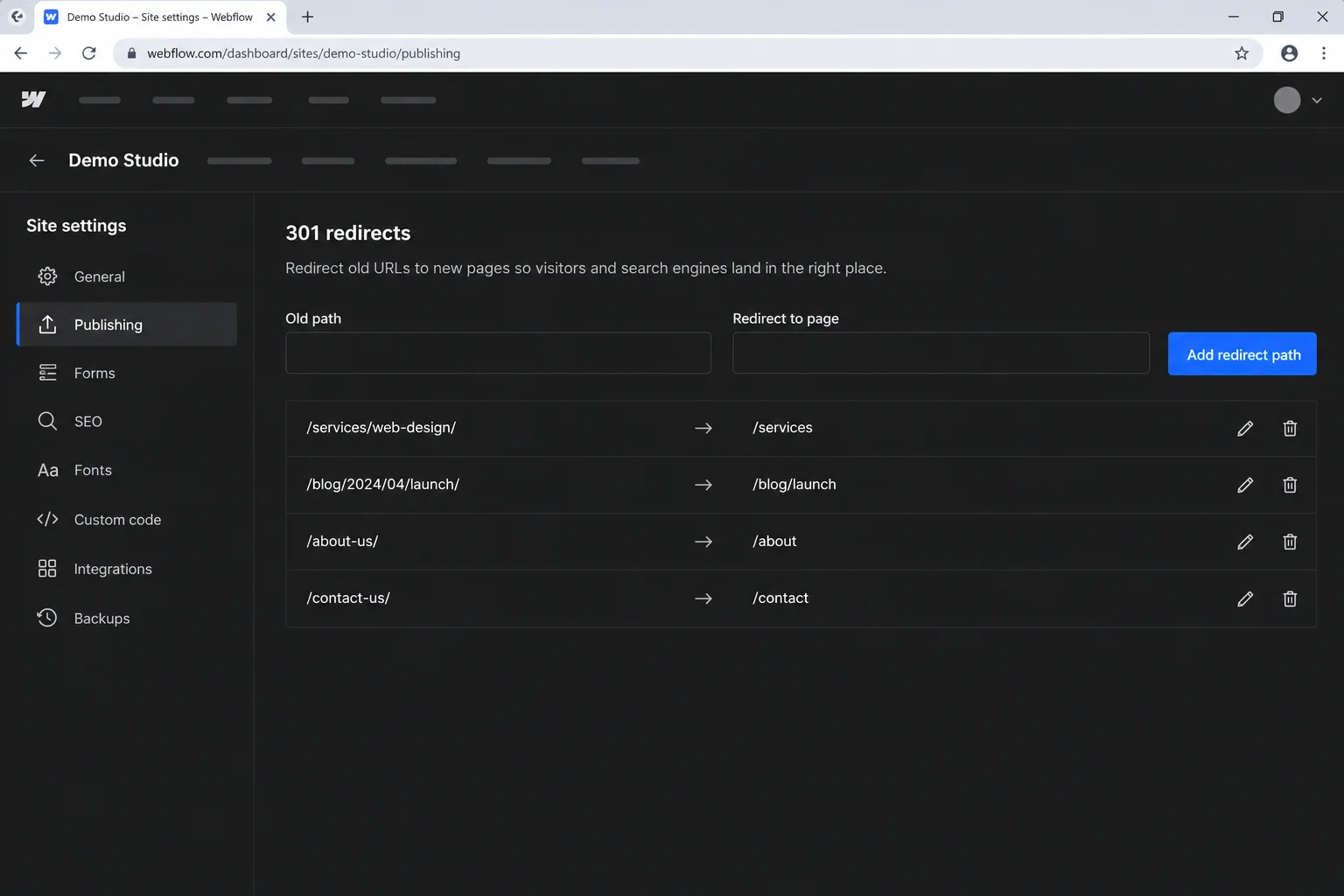
Webflow site settings with 301 redirects added during a migration from WordPress

Why moving platforms puts rankings at risk

The problem

Every platform writes URLs its own way. WordPress uses dated permalinks or category paths, Wix and Squarespace add their own folders, and Webflow puts collection items under a collection slug. Any old URL left without a redirect returns a 404 to Google and to anyone following an old link.

Our solution

We crawl the old site first and list every URL that has traffic or links. Each one gets a destination in the new structure, entered in the 301 redirects panel in Webflow site settings, and we test the full list after the domain moves.

Planning a redesign as well? Doing both in one project avoids moving the content twice.

Plan both together ↗

What our Webflow migration services cover

Content, design, redirects and the tools wired into your old site.

WordPress to Webflow migration

Posts, pages, categories and images exported from WordPress and imported into structured Webflow collections.

Wix and Squarespace moves

Pages and blog content moved off site builders into a Webflow project with a proper class system.

Custom-coded sites

Hand-coded sites rebuilt in Webflow, so editing no longer needs a developer.

URL map and 301 redirects

A spreadsheet of every old URL and its new address, loaded into Webflow and tested after launch.

SEO settings carried over

Titles, meta descriptions and Open Graph images moved page by page, and bound to CMS fields for posts.

Forms and integrations

Forms rebuilt in Webflow and reconnected to your CRM, email tool and analytics.

Running Yoast or Rank Math on WordPress? We carry those titles and descriptions across as well.

Ask about SEO data ↗

Reviews on our technical work and launches

5.0 ★★★★★from 13 reviews on Google
★★★★★
“His deep knowledge of website development, technical SEO, and performance optimization helped us create a fast, user-friendly and search-engine-optimized website. What truly stands out is his attention to detail, quick response time, and continuous support even after project completion.”
SS Suketu Shah
Google review
★★★★★
“Good people, excellent understanding, timely delivered the project with topnotch perfections. First delivered frames archive 98% score on SEO parameter. Good work team, keep it up.”
DJ Deepak Jain
Google review
★★★★★
“Great working with the team, they helped me make my website live in just 5 days. They are helpful even after the project is over.”
AB Ashish Bansal
Google review

Platforms we move sites from

Most moves start on WordPress, Wix or Squarespace. Search Console and a crawler track the URLs before and after.

Squarespace
Wix
Weebly
WordPress
Duda
Framer
Webflow
Search Console
Cloudflare

How a Webflow migration runs

The old site keeps serving visitors until the final step.

01Crawl and inventory
02Collection model
03Import and build
04Redirect map
05Cutover and checks

Ways to buy a Webflow migration

A short call about your current site, then a fixed quote.

Migration with redesign

Best forTeams that want a new design as part of the move.
PricingOne price covering design, build and migration.
TimelineSet in the quote.
IncludesA redesigned Webflow site, imported content and the full redirect map.
Plan a redesign and move ↗

Redirect and SEO check

Best forSites already moved to Webflow that lost traffic.
PricingQuoted per site after a look at Search Console.
TimelineAgreed with the quote.
IncludesMissing redirects found and added, with a list of SEO settings to fix.
Check my migration ↗

If your site is small enough for your team to move by hand, we will give you the URL list and a checklist instead.

Why our migrations keep their search traffic

The redirect map gets as much care as the design.

Every URL accounted for

Old URLs come from a crawl, Search Console and your sitemap, so pages with backlinks are not missed.

Content counts checked

Post, page and image counts in Webflow are compared with the old site before cutover.

No downtime at switch-over

The old site serves visitors until DNS points to Webflow.

Watched after launch

We check Search Console coverage and 404 reports in the weeks after the move.

Moving by hand, content import only, or a planned migration

Three ways teams move a site to Webflow, and what each one leaves out.

What you are weighing Copy and paste by hand Content import only Planned migrationWhat we do
Content Retyped, mistakes likely Imported to collections Imported and counted against the source
Design Rebuilt page by page Not covered Rebuilt or refreshed with a class system
Old URLs Often forgotten Not covered Each mapped to a 301 redirect
SEO settings Re-entered if remembered Sometimes imported Moved and bound to CMS fields
Forms and tools Rebuilt later Not covered Rebuilt and tested before launch
Cost Staff time Low One fixed project

A small brochure site with no blog can often be moved by hand. Sites with years of posts and backlinks need the planned route.

A move to Webflow makes sense when

WordPress plugin updates take more time than content A Wix or Squarespace site has hit its design limits A custom-coded site depends on one developer A rebrand and a platform change are due together The marketing team wants to publish without IT

Sites we move to Webflow

Professional services SaaS & startups Brands & DTC Education Studios & creators

Send your sitemap link and we will tell you how many URLs will need redirects.

Send my sitemap ↗

Webflow migration questions

We export posts, pages and categories from WordPress, clean the content, and import it into Webflow collections by CSV or the Webflow API. Templates are built in Webflow, and every old permalink gets a 301 redirect.

We list each one and decide what replaces it. Caching, security and SEO plugins are no longer needed, some features become Webflow settings, and others become integrations.

A migration always carries some risk. Redirecting every old URL, keeping titles and descriptions, and watching Search Console after launch keeps that risk low.

Yes. Content is exported or crawled, rebuilt in Webflow, and each old address is redirected to its new one.

No. The old site stays live until the domain points to Webflow, and visitors reach one site or the other while DNS updates.

Email stays where it is. We only change the DNS records for the website and leave your mail records alone.

Yes. We can rebuild it as it is, or use the move to refresh it. Both options are quoted so you can compare them.

It depends on how many pages and posts move and whether a redesign is included. The date is written in the quote.

A fixed price based on content volume, the number of collections and design scope. You know the full cost before anything moves.

Tell us about the site you want to move

    HAVE AN IDEA?

    tell us about it.
    ↗