WooCommerce migration services

WooCommerce migration services for stores leaving Shopify, Magento, OpenCart or an older cart. We build the new store beside the old one, move products, customers and orders, redirect every old URL, and switch over once the counts match.

Plan my migration ↗
Migration plan and quote first Data moved into your accounts Rated 5.0 on Google
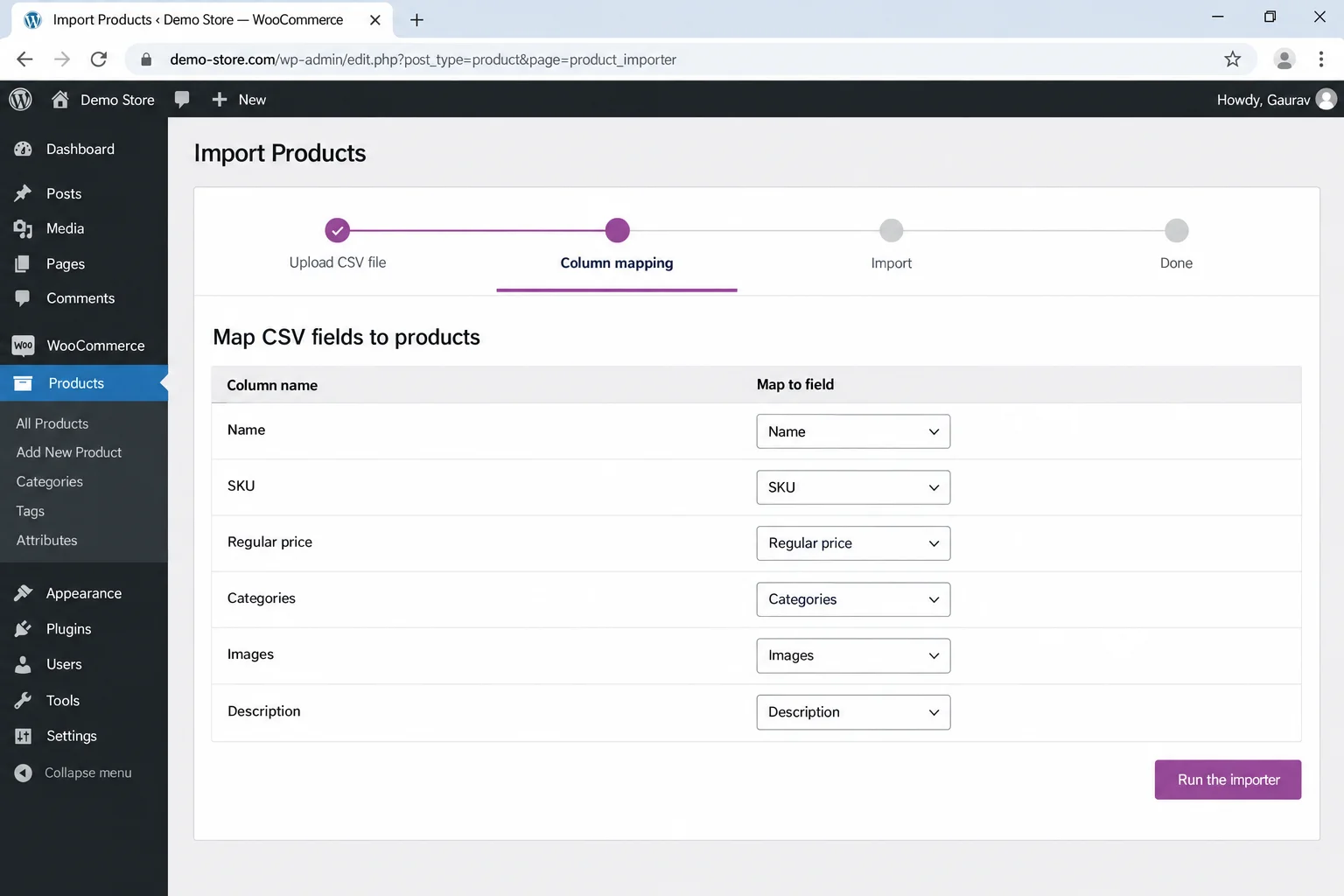
WooCommerce product CSV importer mapping columns during a store migration

Why store owners put off moving platforms

The problem

Most owners know their platform costs too much or holds them back. They stay because a move sounds like lost orders, broken links and a week offline. Meanwhile the monthly fees and app subscriptions keep running.

Our solution

We treat the move as three jobs: the data, the URLs and the switch-over. The old store keeps taking orders while we build and test the new one on staging, and we switch only after product, customer and order counts match.

Send us your current platform and your list of paid apps. We will tell you which ones have a WooCommerce equivalent.

Get a migration plan ↗

What our WooCommerce migration services move and check

The parts of a store that have to survive the move, and how we check each one.

Products and variations

Titles, descriptions, images, prices, stock and variations mapped to WooCommerce attributes, then counted against the source.

Customers and order history

Customer accounts and past orders brought across, so repeat buyers can log in and your sales reports stay complete.

URL redirects

A redirect for every product, category and page URL, tested before switch-over so search traffic and backlinks still land.

Store design

Your current look rebuilt on WordPress, or a refresh if parts of the old design never worked.

Gateways, tax and shipping

Payment gateways, tax classes and shipping zones set up fresh and tested with real orders.

Switch-over day

A short data freeze, a final sync and a rollback plan, timed for the hours your store is quietest.

Planning a Shopify to WooCommerce migration? We list your Shopify apps and match each one during planning.

Ask about Shopify moves ↗

Reviews from clients we have worked with

5.0 ★★★★★from 13 reviews on Google
★★★★★
“Great working with the team, they helped me make my website live in just 5 days. They are helpful even after the project is over.”
AB Ashish Bansal
Google review
★★★★★
“He was attentive, creative, and always open to feedback, which made the entire process smooth and enjoyable. His ability to understand our vision and translate it into a clean, functional, and beautifully designed website truly stood out.”
FC Fiza Chhuvara
The Furr Studio · Google review
★★★★★
“Very professional and very hard working guys.”
NY Nagendra Yadav
Google review

Platforms we move stores from

Shopify, Magento, OpenCart, PrestaShop, BigCommerce and the site builders below, moved onto WooCommerce and WordPress.

Shopify
Magento
OpenCart
PrestaShop
BigCommerce
Wix
Squarespace
Weebly
Webflow
WooCommerce
WordPress
MySQL
Cloudflare
Yoast SEO

How a WooCommerce migration runs

The old store keeps selling until the last step.

01Audit the current store
02Build the new store on staging
03Move and check the data
04Map and test redirects
05Final sync and switch-over

Ways to buy a store migration

A free call and a look at your store first, then a fixed quote.

Data and redirects only

Best forTeams with a WooCommerce store already built who need the data and URLs moved.
PricingPriced by data volume and the number of URLs.
TimelineSet in the quote.
IncludesImported products, customers and orders, a redirect map and a count report.
Ask about a data move ↗

Migration review

Best forOwners still deciding whether to move at all.
PricingA fixed price per store.
TimelineSet when you order it.
IncludesA list of what moves easily, what needs custom work and which apps have WooCommerce equivalents.
Request a review ↗

If staying on your current platform makes more sense, the review will say so.

How we keep a store migration safe

A good migration is one your customers never notice.

Counts before switch-over

Product, customer and order counts and totals are compared with the source before we change DNS.

Redirects tested

We crawl the old URL list against the new store and fix every miss before launch.

Old store stays live

Orders keep coming in on the old platform until the switch, and a final sync brings them across.

Rollback plan

If something looks wrong on switch-over day, DNS can point back to the old store while we fix it.

Automated import tool, DIY CSV export or a managed migration

Three common ways to move a store to WooCommerce, and what each one leaves to you.

What you are weighing Automated import tool DIY CSV export Managed migrationWhat we do
Products and variations Moved, mapping can be rough Simple products only, variations by hand Mapped to clean attributes and checked
Customers and orders Usually moved, often at extra cost Hard to import correctly Moved and counted against the source
URL redirects Partial or none Up to you Every old URL mapped and tested
Design Not included Not included Rebuilt or refreshed on WordPress
Apps and integrations Not included Not included Matched to extensions or custom code
Who checks the result You You We do, with a written report

For a small catalogue with simple products, an import tool and an afternoon may be enough. Larger stores with order history and rankings to protect usually need the managed route.

A move to WooCommerce makes sense when

Platform fees and app subscriptions keep rising You want to own the store data and the code Your platform blocks a feature you need You want content and products on one WordPress site An old cart no longer gets security updates

Store types we migrate

Fashion & apparel Beauty & wellness Electronics Food & beverage Consumer goods B2B & wholesale

Still on Magento 1 or an old OpenCart version? Tell us the version, because those moves are often urgent.

Start a migration ↗

Questions about WooCommerce migration services

Products, variations, customers, order history, store pages and blog posts moved to WooCommerce, plus a redirect for every old URL, a rebuilt or refreshed design, and fresh gateway and shipping setup.

We export products, customers and orders from Shopify, map them to WooCommerce and rebuild the theme on WordPress. Shopify URLs under /products/ and /collections/ are redirected to their new addresses, and each app is matched to an extension or a built-in setting.

No. The old store keeps selling while we build on staging. New orders are synced at the end, and the switch-over itself is short and timed for your quietest hours.

With a full redirect map and matching page structure, rankings usually carry across. We test every redirect before launch and watch Search Console after the switch.

Yes. Accounts and order history move across. Passwords from most platforms cannot be copied, so customers set a new one through a reset email, which we prepare for you.

Yes. Large catalogues are imported by script in batches, then checked with counts and spot checks on random products.

Each one is matched to a WooCommerce extension, a built-in feature or a small custom plugin. Some turn out to be unnecessary and are dropped.

It depends on data volume, design work and app replacements. The date is in the quote, and the old store keeps selling until switch-over.

A fixed price based on product, customer and order volume, design scope and the apps that need replacing. You get it in writing before we start.

Describe the store you plan to move

    HAVE AN IDEA?

    tell us about it.
    ↗