Customer portal development

Customer portal development for businesses that answer the same requests by email every day. We build portals where clients, members or dealers log in to see their own invoices, documents, orders and requests, connected to the systems you already use.

Plan my portal ↗
Portal scope quoted in writing You own the accounts and the data Rated 5.0 on Google
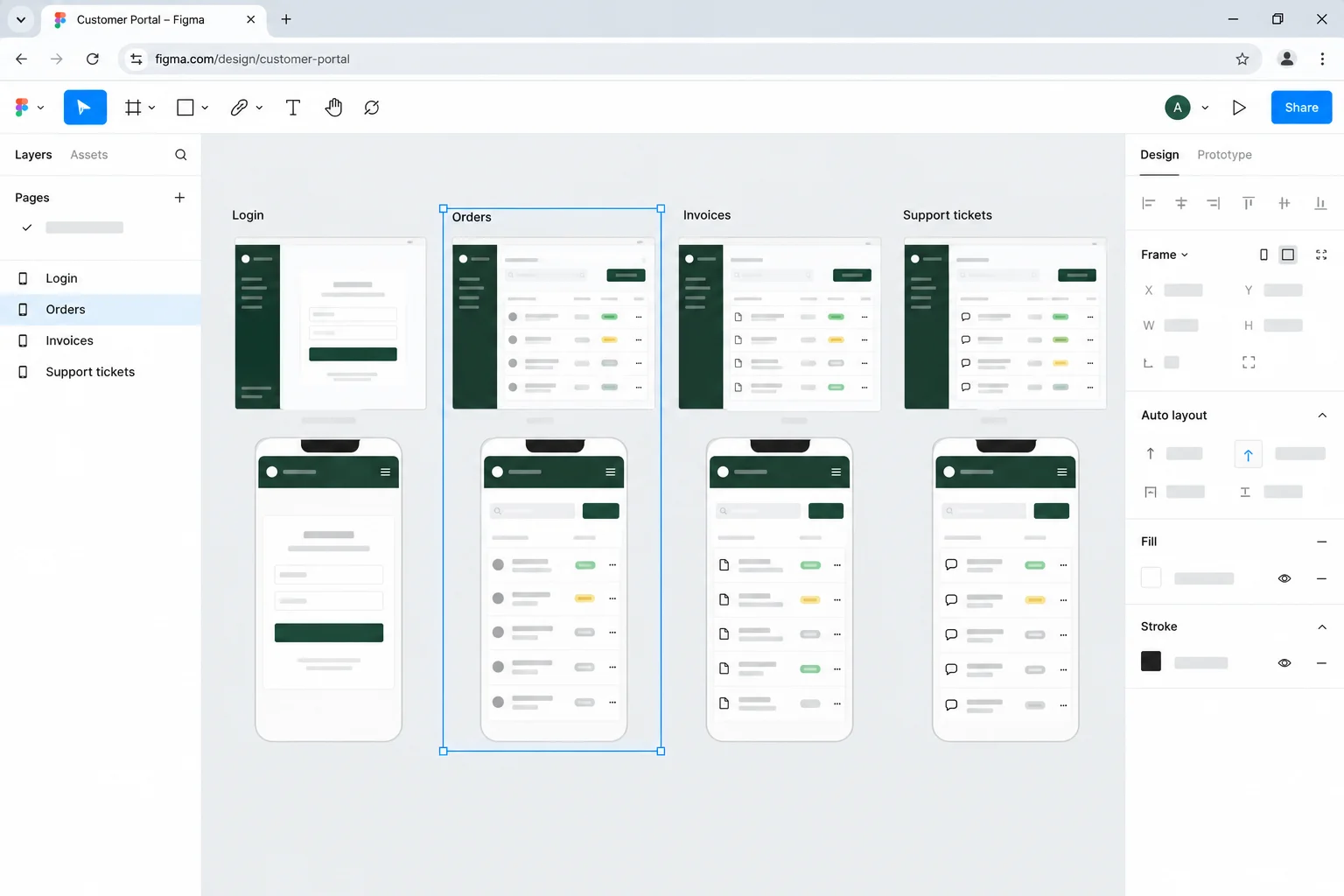
Figma file with customer portal screens: login, orders and invoices

When your inbox becomes the customer portal

The problem

Invoices are requested by email, order statuses are checked by phone, and the same contract gets sent for the third time. The business runs, but a growing part of each day goes to looking things up for customers.

Our solution

A portal gives each customer a secure login and a view of their own records. The routine requests move out of the inbox, and customers find what they need at any hour.

Count the resend requests in your inbox this week. That list is the first draft of your portal.

Book a free call ↗

What our customer portal development covers

Self-service for every group that keeps emailing you.

Client portals

Clients see orders, invoices, documents and project progress without asking.

Member portals

Member areas with subscriptions, renewals and gated content.

Dealer and partner portals

Dealers, resellers and suppliers get their own prices, stock and order views.

Secure logins

Verified email, password resets, two-factor options and session limits.

Documents and statements

Contracts, statements and files stored per account and updated from your systems.

Requests and tickets

Structured requests that replace email threads, with a status both sides can see.

Payments

Invoice payments and saved cards through Stripe or Razorpay, inside the portal.

Already have a CRM or billing system? The portal can read from it, so nobody types data twice.

Ask about integrations ↗

Reviews from clients we have built for

5.0 ★★★★★from 13 reviews on Google
★★★★★
“Their team was professional, responsive, and truly understood our vision. They delivered a sleek, user-friendly site that reflects our brand beautifully. The entire process was smooth, and the result exceeded our expectations.”
SN Stephanie Neuer
Google review
★★★★★
“Very professional and very hard working guys.”
NY Nagendra Yadav
Google review
★★★★★
“The team completed our WordPress website in just 15 days, and honestly, there were almost no revisions required because they got everything right the first time. The design is clean, fast, mobile-friendly, and perfectly matches our brand.”
GP Ganesh Patil
Bappaz Kids Studio · Google review

Tools we build portals with

Next.js and TypeScript for the portal, Auth0 or a custom login for accounts, PostgreSQL for records, and Stripe or Razorpay for payments.

React
Next.js
TypeScript
Node.js
Auth0
PostgreSQL
MongoDB
Prisma
Redis
Stripe
Razorpay
AWS
Cloudflare
Sentry

How we plan and build a customer portal

The portal is built around the requests you already get.

01List what customers ask for
02Model accounts and roles
03Build login and core views
04Connect your systems
05Pilot, then roll out

Ways to buy a customer portal

Scoping happens on a free call, and you get one written price before any build work.

Portal on your existing site

Best forA login area added to a current WordPress site or web application.
PricingPriced after we review the site and the data sources.
TimelineSet in the quote.
IncludesAccounts, the agreed screens and links to your current systems.
Ask about adding a portal ↗

Portal support

Best forLive portals that need new roles, screens or fixes each month.
PricingA monthly block of developer hours.
TimelineMonth by month, ended with 30 days notice.
IncludesA monthly change log and a chat line to your developer.
Talk about support ↗

If a membership plugin or your CRM's own portal covers your needs, we will say so first.

What makes a customer portal worth building

A portal earns its cost through the requests it takes off your team.

Built from real requests

Screens are chosen from the emails and calls you already handle.

Access control first

Every record is checked against the user and company before it is shown.

Works on phones

Most customers check a status from a phone, so every screen is tested there.

Live data

Billing and CRM data sync in, so the portal never shows yesterday's numbers.

Membership plugin, CRM portal add-on or a custom customer portal

Three ways to give customers a login.

What you are weighing Membership plugin CRM or helpdesk portal Custom portalWhat we build
What customers see Gated pages Tickets and a help centre Their own records, documents and actions
Data from other systems Little or none From that one vendor From any system with an API
Design Your theme Vendor template Your design and domain
Cost over time A yearly licence Per-seat fees A build price, then hosting
Roles for companies and teams Basic Set by the vendor Modelled on your accounts

For gated content or simple support tickets, a plugin or your helpdesk portal is often enough. A custom portal fits when customers need their own data from several systems.

A customer portal makes sense when

Clients email every week for documents or status updates Members need renewals and gated content Dealers or partners need their own prices and stock Sensitive files go out as email attachments Support time grows faster than revenue

Sectors we build portals for

Professional services Finance & insurance Education & training Associations & clubs Distribution & B2B Health & wellness

Sharing client files over email today? A portal also keeps a record of who downloaded what.

Start a project ↗

Customer portal questions

A secure area where each customer logs in and sees their own data: orders, invoices, documents, statuses and requests. It replaces much of the email back and forth with self-service.

A fixed quote based on the number of roles, screens and integrations. Weigh it against the support hours the portal removes each month.

Mostly in the name. A client portal usually serves service businesses sharing files, invoices and project updates, while a customer portal often adds orders and payments. We build both on the same foundations.

A plugin gates pages. A portal shows each user their own data. Once accounts need their own documents, statuses or billing, the plugin approach stops fitting.

Verified logins, encrypted connections, role-based access checked on every request, and session limits. Access rules are part of the data model from the start.

Yes. Invoices, balances and account details sync from the systems you already run.

Yes. Invoice payments, subscriptions and saved cards can run through Stripe, Razorpay or your current gateway.

The two or three requests that fill your inbox today, such as invoices, documents or order status. Launch those, measure the drop in emails, then add more.

Yes, and we recommend it. A small group tests the portal before full rollout, so problems show up while they are cheap to fix.

It depends on roles, screens and integrations. The date is in the quote, and the pilot group gets access before the full launch.

Tell us what your customers keep asking for

    HAVE AN IDEA?

    tell us about it.
    ↗