
Shopify speed optimization service

A Shopify speed optimization service for stores whose product pages feel slow on a phone. We find the app scripts, image sizes and theme code that cost the most time, remove them on a duplicate theme, and send you a report with the numbers from before and after.

Request a speed check ↗
Free speed check, then one quote Collaborator access you can remove Rated 5.0 on Google
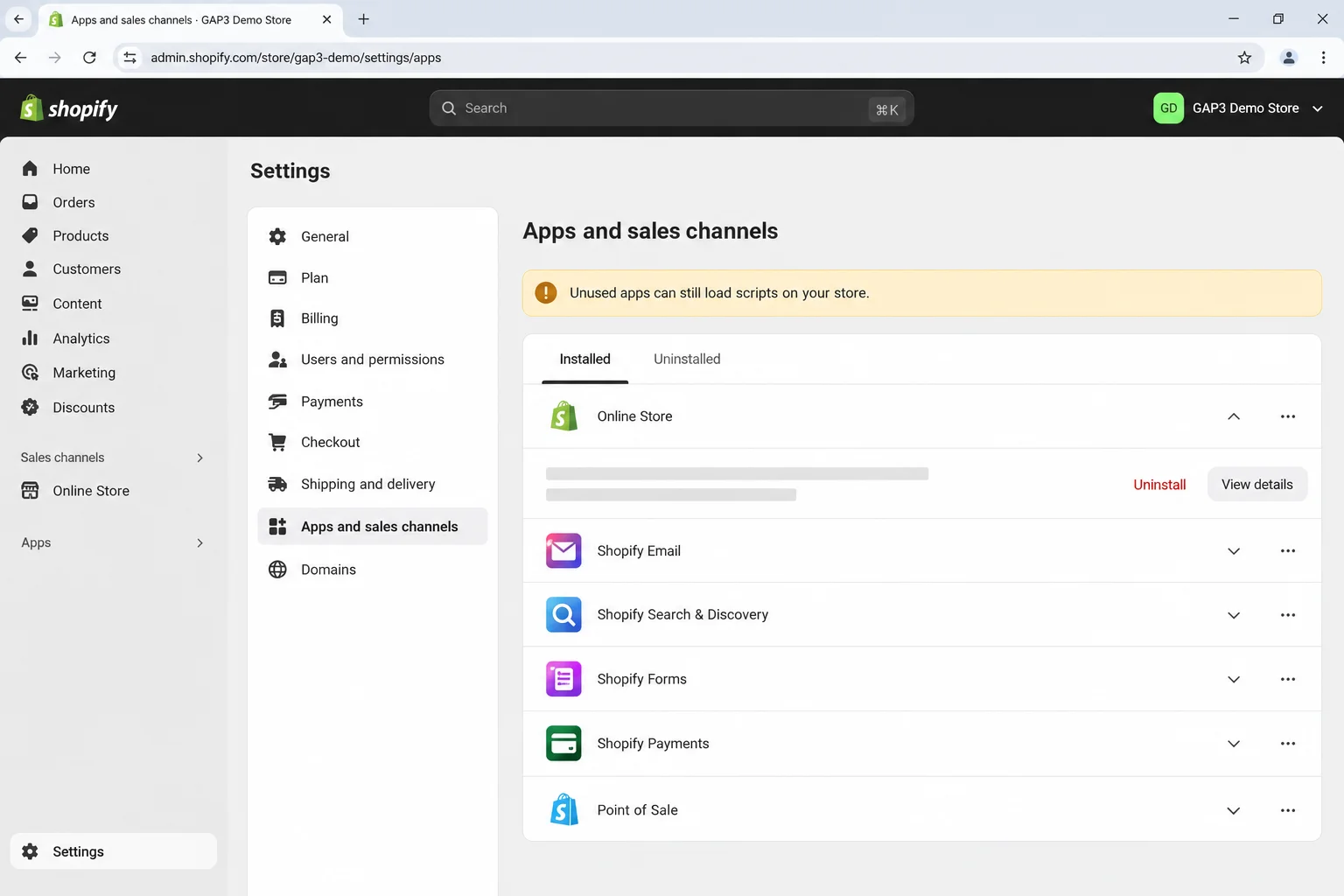
Shopify Apps page during a speed clean-up, showing installed apps to review

Where a Shopify store loses its speed

The problem

Shopify hosting and its CDN are fast. The slowdown comes from what sits on top: apps that add scripts to every page, code left behind by apps you removed months ago, product photos uploaded at full camera size, and a theme that kept sections from three redesigns.

Our solution

We measure what loads on the home, collection and product pages, then remove the weight in order of cost. We judge the result on Core Web Vitals from real shoppers, with lab tests as a guide along the way.

Want to see what your product page loads right now? We will send you the list.

Check my store speed ↗

Problems our Shopify speed optimization service fixes

Everything between a shopper's tap and a page they can use.

Speed audit

A waterfall of the home, collection and product pages showing each script, image and font and the time it costs.

Leftover app code

Snippets and script tags from uninstalled apps found in the theme files and removed.

App review

Each installed app weighed for its speed cost against what it earns, with a keep, replace or remove note.

Images and video

Product and banner images served at the right size for each screen, with lazy loading below the first view.

Theme code

Unused sections, render-blocking scripts and duplicate CSS from past redesigns taken out.

Shopify Core Web Vitals

LCP, INP and CLS improved on the templates with the most traffic, then checked again after publishing.

Running a WooCommerce store instead? We speed those up as well.

See WooCommerce speed work ↗

Clients on fast and search-friendly websites

5.0 ★★★★★from 13 reviews on Google
★★★★★
“His deep knowledge of website development, technical SEO, and performance optimization helped us create a fast, user-friendly and search-engine-optimized website. What truly stands out is his attention to detail, quick response time, and continuous support even after project completion.”
SS Suketu Shah
Google review
★★★★★
“Good people, excellent understanding, timely delivered the project with topnotch perfections. First delivered frames archive 98% score on SEO parameter. Good work team, keep it up.”
DJ Deepak Jain
Google review
★★★★★
“Great working with the team, they helped me make my website live in just 5 days. They are helpful even after the project is over.”
AB Ashish Bansal
Google review

How we measure Shopify store speed

PageSpeed Insights, the Chrome UX Report and the web performance report in your Shopify admin for numbers, then image and code tools for the fixes.

Shopify
PageSpeed
Web Vitals
GA4
Cloudflare
Figma
Photoshop

Steps in a Shopify speed project

Measured first, fixed on a copy, and published only when both the numbers and the store check out.

01Baseline on real devices
02List fixes by impact
03Fix on a duplicate theme
04Check speed and features
05Publish and report

Speed work options for Shopify stores

The speed check is free. The quote that follows covers only the fixes it finds.

App and code clean-up

Best forStores that have installed and removed many apps over the years.
PricingPriced after we count the leftover code in the theme.
TimelineUsually a few working days.
IncludesRemoved snippets, a list of the apps they came from and new speed numbers.
Clean up my theme ↗

Regular speed check

Best forStores that add apps, campaigns and products often.
PricingA fixed fee per check, agreed upfront.
TimelineOn a schedule you choose, cancel any time.
IncludesA Core Web Vitals review and small fixes when the numbers slip.
Ask about speed checks ↗

If one app is the main cause and you need it, we will show you the trade-off and let you decide.

Why our Shopify speed fixes last

Scores can be gamed for a screenshot. We work on what shoppers feel on their phones.

Weight removed

We take scripts and code out instead of hiding them behind loading tricks that fail on slow networks.

Store features still work

Cart drawers, filters, reviews and upsells are tested on the preview theme before it goes live.

Judged on phones

Results are checked on a mid-range Android phone over mobile data.

Plain reporting

Before and after numbers, with a line on what each change did.

Speed app, new theme or fixing the causes

Three common answers to a slow Shopify store.

What you are weighing Speed booster app Switching theme Fixing the causesWhat we do
Cost Monthly app fee Theme licence plus setup work One fixed quote
Effect on LCP Little change while images stay heavy Can help if the old theme was heavy Targets the largest element on each template
Effect on INP Can get worse, since it adds a script Depends on the apps you keep App and theme scripts reduced
Risk Conflicts with other apps Rebuilding every customization Tested on a duplicate theme
Leftover app code Stays in the theme Left behind with the old theme Removed

Sometimes a newer theme is the right call, for example when the current one is several years out of date. The speed check will tell you.

Signs your Shopify store needs speed work

Product pages take a few seconds to show on a phone Search Console flags poor Core Web Vitals Many apps have been installed and removed Ad costs went up and conversion went down The theme has carried over several redesigns

Store categories we speed up

Fashion Beauty & skincare Consumer goods Lifestyle Jewellery DTC brands

Send your store URL and your best-selling product page. We start the check there.

Start the speed check ↗

Questions about Shopify store speed

Usually a mix of app scripts on every page, code from removed apps, oversized images and theme weight from past redesigns. The speed check shows which apply to your store and in what order to fix them.

Often, yes. Apps that wrote code into the theme leave it there when you uninstall them. Finding and removing that code is one of the most reliable speed gains on Shopify.

They are Google's three page experience measures applied to your store: LCP for how fast the main content shows, INP for how quickly the page reacts to taps, and CLS for how much the layout jumps. Shopify shows the same measures in its web performance report.

Yes. Google counts them among its page experience signals for ranking. Slow product pages also lose shoppers you already paid to bring in.

Usually, through images, theme code and leftover scripts. If one app costs more in lost speed than it earns, we will show you the numbers so you can decide.

No. The design, sections and settings stay the same for shoppers and for your team in the theme editor.

Most stores take one to two weeks, including tests on the duplicate theme. Heavily customized themes or stores with many apps can take longer.

The speed check lists the problems in your theme, apps and images, and the quote prices each fix. You see the likely gains and the cost before you decide.

Ask for a free Shopify speed check

    HAVE AN IDEA?

    tell us about it.
    ↗