Webflow ecommerce development

Webflow ecommerce development for brands with a focused product range and a strong look. We design the product pages, cart and checkout in Webflow, connect Stripe and PayPal, and test the store with real orders before launch.

Plan my store ↗
Store scope in writing Ecommerce plan billed to you Rated 5.0 on Google
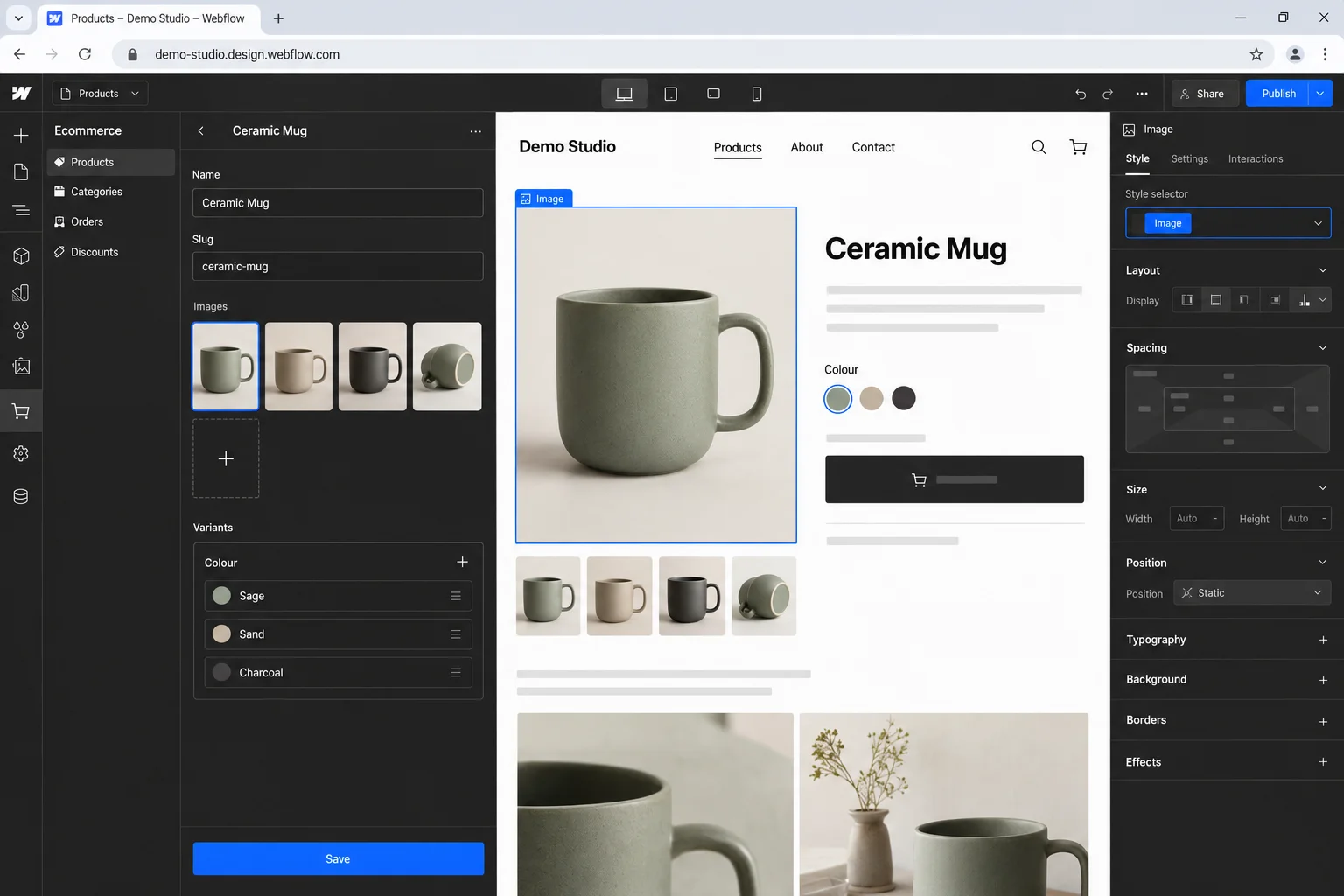
Webflow Ecommerce product settings with variants and images

When a store theme hides the brand

The problem

Many small brands start on a store theme that looks like thousands of other shops. Product pages follow the theme layout, and changing how the cart or checkout looks means paying for an app or editing theme code.

Our solution

Webflow Ecommerce lets us design product templates, the cart and the checkout like any other page in the Designer. Products sit in their own catalog, so your team edits names, prices, variants and stock from one dashboard.

If your catalog needs subscriptions, large variant sets or many apps, Shopify may fit better. We will say so on the first call.

Check if my store fits ↗

What our Webflow ecommerce development includes

Store work from the catalog plan to the first real order.

Catalog structure

Products, categories, variants and custom fields planned before any design work.

Product templates

One product template designed around how your customers decide, with images, options and delivery details where they look.

Cart and checkout

Cart, checkout and order confirmation pages styled to the brand in the Webflow Designer.

Payments and tax

Stripe and PayPal connected, with currencies and tax settings checked against your business.

Shipping rules

Shipping zones and methods set up for the places you sell to.

Order emails

Webflow order and shipping emails edited to match the store, plus Klaviyo or Mailchimp for marketing email.

Already selling on another platform? We can plan the product import before you decide to move.

Plan a store move ↗

Reviews from clients we built websites for

5.0 ★★★★★from 13 reviews on Google
★★★★★
“Very professional and very hard working guys.”
NY Nagendra Yadav
Google review
★★★★★
“I had the pleasure of working with the GAP3 team, and I must say the experience was excellent. Special thanks to Gaurav, who never compromises on quality and ensures the work is done exactly as required. They deliver top-quality results within deadlines.”
DV Darshan Vadher
Google review
★★★★★
“He was attentive, creative, and always open to feedback, which made the entire process smooth and enjoyable. His ability to understand our vision and translate it into a clean, functional, and beautifully designed website truly stood out.”
FC Fiza Chhuvara
The Furr Studio · Google review

Store tools we connect to Webflow

Webflow Ecommerce for products and checkout, Stripe and PayPal for payments, and email and analytics tools around them.

Webflow
Stripe
PayPal
Klaviyo
Mailchimp
GA4
Figma
Hotjar

How we build a Webflow store

The catalog comes first, because it shapes every template.

01Catalog and plan check
02Store design
03Build and import
04Payments, tax and shipping
05Test orders and launch

Ways to order a Webflow store

We talk through your catalog first and then send a quote in writing.

Add a store to your site

Best forAn existing Webflow marketing site that now needs to sell.
PricingPriced by the number of new templates and products.
TimelineSet in the quote.
IncludesEcommerce templates in your current design, with payments and shipping set up.
Add selling to my site ↗

Store changes

Best forA live Webflow store that needs a new product template, checkout styling or a fix.
PricingQuoted per change.
TimelineAgreed with the quote.
IncludesThe change, tested with an order, and a short note.
Send the change ↗

If your product range is likely to outgrow Webflow within a year, we will recommend another platform before you pay for a build.

Why brands build Webflow stores with us

We also build Shopify and WooCommerce stores, so the platform advice comes with a comparison.

Plan limits checked first

Item counts and features are matched to a Webflow Ecommerce plan before design starts.

Tested with real orders

Payments and refunds are tested on phones before launch day.

Run by your team

Products, prices and stock are edited from the Webflow dashboard after handover.

Content and store together

Blog posts, lookbooks and product pages share one CMS, so stories can link straight to products.

Shopify, WooCommerce or Webflow Ecommerce

Three platforms we build stores on, compared for a small brand.

What you are weighing Shopify WooCommerce Webflow EcommerceThis page
Best fit Growing catalogs that need many apps Stores that need custom rules on WordPress Small, design-led product ranges
Design control Theme sections and Liquid code Theme and PHP code Every template designed in the Designer
Payments Shopify Payments and many gateways Most gateways through plugins Stripe and PayPal
Apps and add-ons Large app store Large plugin library Fewer, often through integrations
Hosting Included Your own host Included in the Ecommerce plan
Content pages Basic blog Full WordPress Full Webflow CMS

Webflow Ecommerce works best for brands where the story sells the product. For large catalogs, Shopify is usually the safer start.

Webflow ecommerce websites suit brands that

Sell a short product range with a strong visual identity Want content and products in one site Sell digital downloads alongside physical goods Already run a marketing site on Webflow Care more about design control than app count

Product categories that fit a Webflow store

Beauty & skincare Fashion Lifestyle Digital products Jewellery Merch & DTC

Tell us roughly how many products you sell today and how many you plan to add next year.

Share my catalog size ↗

Webflow ecommerce questions

For a focused product range where design matters, yes. For large catalogs, many variants or app-heavy setups, Shopify or WooCommerce usually fit better, and we build on both.

Each Webflow Ecommerce plan has an item limit, and the higher plans allow more. We check your catalog against the current limits before quoting.

Stripe and PayPal. Through Stripe, customers can pay by card and with wallets such as Apple Pay and Google Pay.

Yes. The cart and checkout pages are edited in the Webflow Designer, so we match fonts, colours and layout to the rest of the store.

Yes. Webflow Ecommerce supports digital products, with the download link sent after purchase.

If the catalog fits Webflow, yes. We import products from a CSV file, rebuild the templates and redirect old product URLs. If it does not fit, we tell you before any work starts.

Orders, products, stock and shipping are handled in the Webflow dashboard. We train your team on it at handover.

The build is a fixed price based on templates, product count and integrations. The Webflow Ecommerce plan is billed to you by Webflow.

Yes, under your brand and with an NDA signed first. Our partners page explains the terms.

Tell us about your store and products

    HAVE AN IDEA?

    tell us about it.
    ↗