Did Google’s November 2026 Core Update Hit Your Site? A 15-Minute Check

SHORT ANSWER
Maybe. Truth is, nobody can say for sure until Google finishes rolling it out. This Google core update began on November 10, 2026, and Google gave it up to two weeks. Today, spend 15 minutes ruling out other causes. A full week after it finishes, compare that week with the week before November 10. Small position drops usually need no fix.
Rankings bouncing around since November 10? You’re not imagining it. Google started rolling out its November 2026 core update that day, and it’ll still be shuffling results when Black Friday week starts. If you run a store, that’s about the worst week there is to be staring at a red line in Search Console.
So here’s what this guide does. You get a 15-minute check you can run today, a simple way to tell a small dip from a real drop, and a short list of things to leave alone while the google core update is still moving. Most of it comes from Google’s own core update guidance, plus a lot of hours spent inside Search Console accounts.
Fair warning: GAP3 is a web and digital marketing agency in Ahmedabad, and yes, we sell SEO. Most sites don’t need an agency after a core update, though. We’ll tell you when you do, near the end.
Not sure what your Search Console is telling you?
Send us your site. We’ll read the week before and after the update with you and tell you plainly whether anything needs fixing.
What Google changed on November 10, and why the timing is awkward
Google posted the update on its Search Status Dashboard on November 10, 2026, and said it applies globally, in all languages, with a rollout that may take up to two weeks. It’s the third Google core update of 2026, according to Search Engine Journal.
What does it target? Google didn’t say. It almost never does. Its docs say core updates don’t go after specific sites or pages, and your rankings can shift just because someone else’s content got better. Keep that in mind. A drop doesn’t automatically mean you broke something.
How long will it run? The two earlier core updates this year each took 12 days: March ran from March 27 to April 8, and May ran from May 21 to June 2. The December 2025 update took longer, 18 days in total. Our guess is that November finishes somewhere between November 22 and November 28. That’s a guess, not a promise. Check the dashboard.
Now look at the calendar. US Thanksgiving is November 26, Black Friday is November 27 and Cyber Monday is November 30. So the first clean week after this rollout will be full of holiday traffic. We come back to that problem below, because it can fool you in both directions.
The 15-minute check you can run today
You’ll need Search Console access and a timer. That’s it. Today isn’t about a final verdict. It’s about knowing whether to worry, and about stopping yourself from making changes you’ll regret next month.
Minutes 0 to 2: confirm the dates
Open the Search Status Dashboard and find the November 2026 core update. Write down the start date, November 10, and check whether Google has added an end date yet. If there’s no end date, everything you see this week is provisional. Rankings can move up and down more than once during a rollout.
Minutes 2 to 5: rule out the boring causes
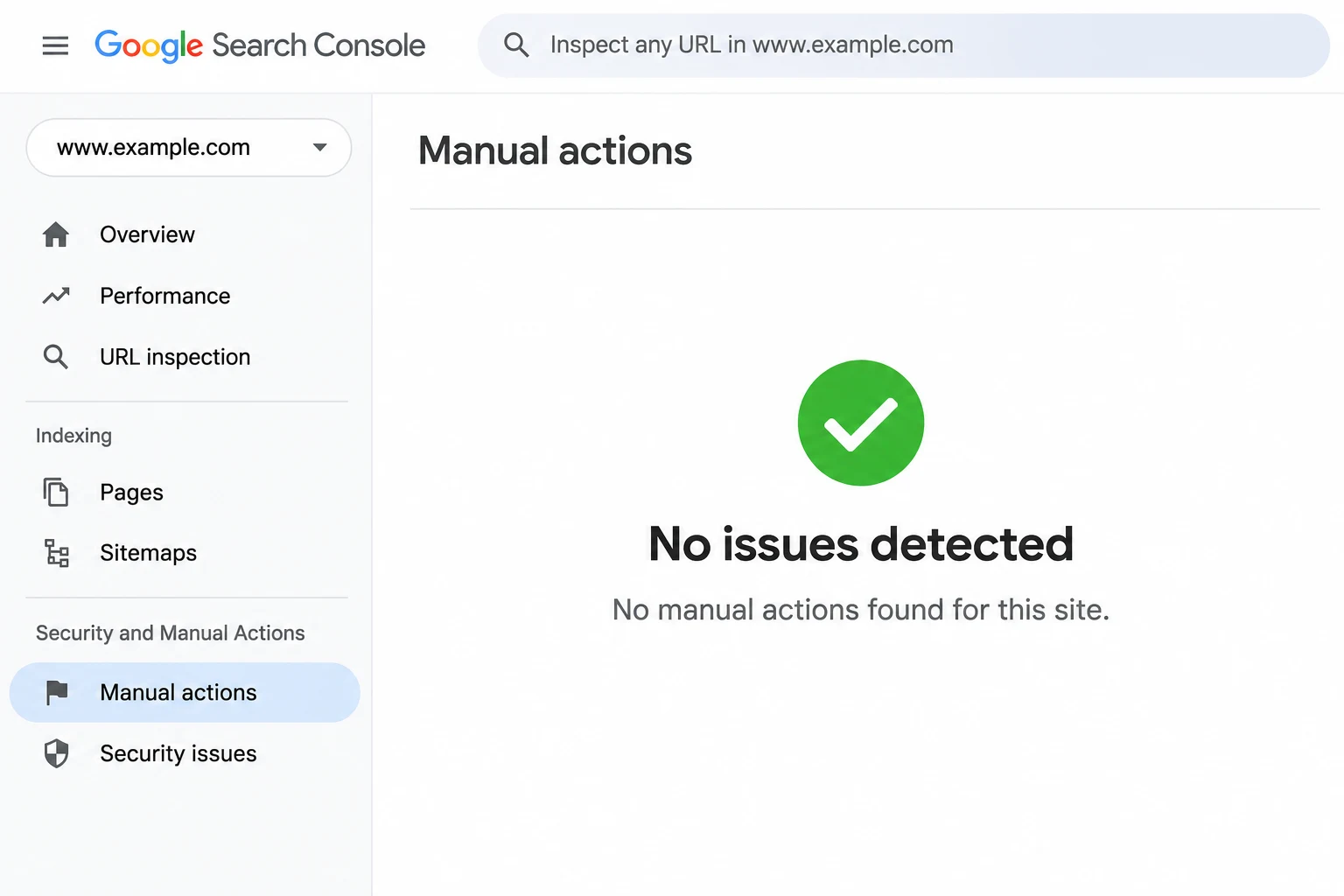
Plenty of drops that get blamed on Google turn out to be something else. In Search Console, go to Security and Manual Actions, then Manual Actions. You want it to say no issues detected. Then open the Pages report and check whether your indexed page count suddenly fell.
Next, open your site in a private window. Does it even load? Did a plugin or theme update last week sneak in a noindex tag or break your analytics tag? (It happens more often than you’d think.) If traffic fell off a cliff overnight, across the whole site at once, look for a technical problem first. Core update drops usually creep in over several days.
One more trap. If you use the newer Generative AI performance report, you may have seen impressions dip from November 9 to 11. That was a Google bug. Google listed it on its data anomalies page as a logging error that affects data logging only, and Search Engine Roundtable confirmed it had no impact on actual search performance.
Minutes 5 to 10: compare two weeks in Search Console
Go to Performance, then Search results, click the date filter and choose Compare. For a first look today, compare the last 7 days with November 3 to 9, the week before the update started. Write down three numbers for each week: clicks, impressions and average position.
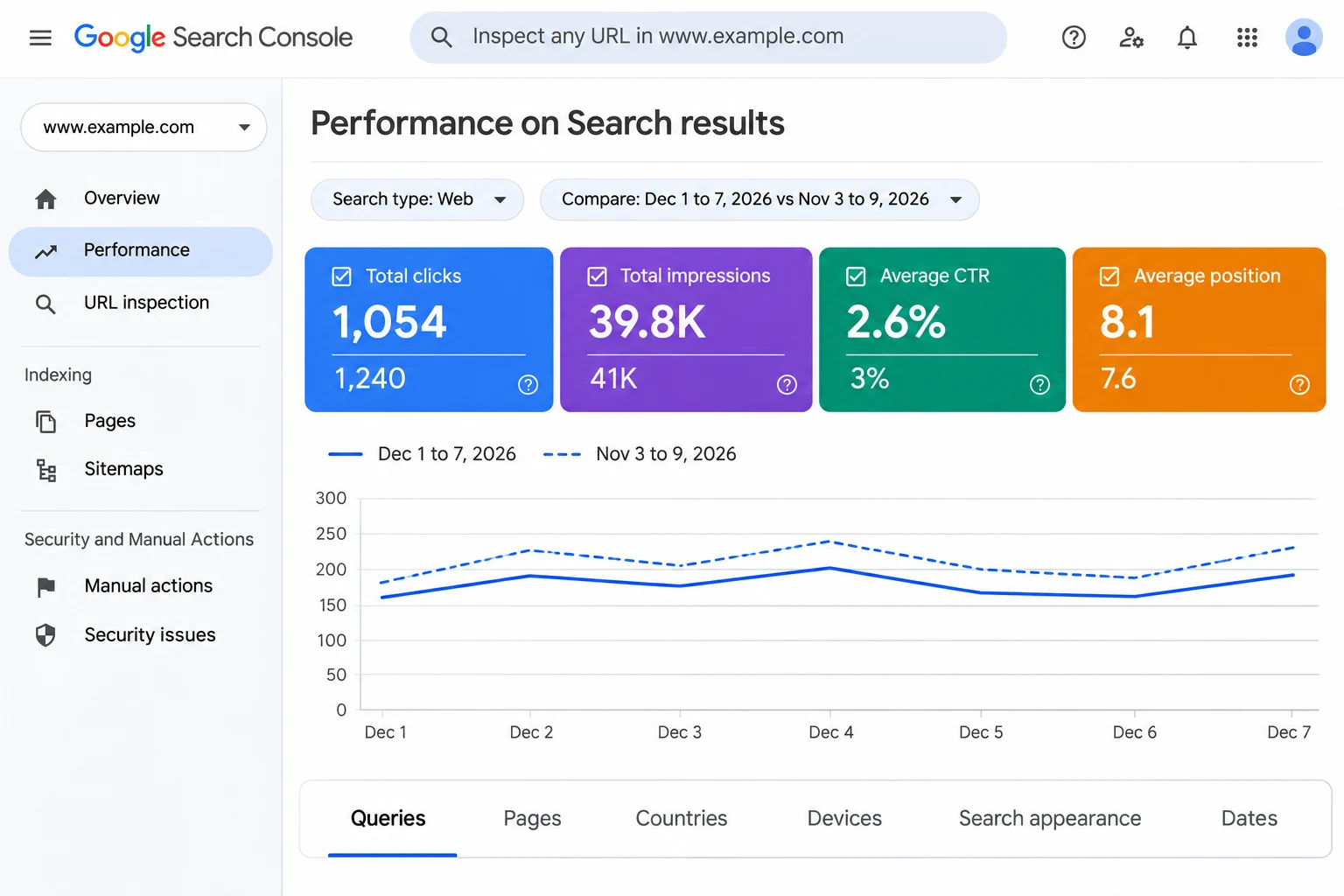
Think of today’s numbers as a weather forecast. Useful, but not the result. Google’s own method is stricter: wait at least a full week after the update completes, then compare that week with the week before the rollout began. Put a reminder in your calendar now, because you will forget.
Minutes 10 to 13: find the pages that moved
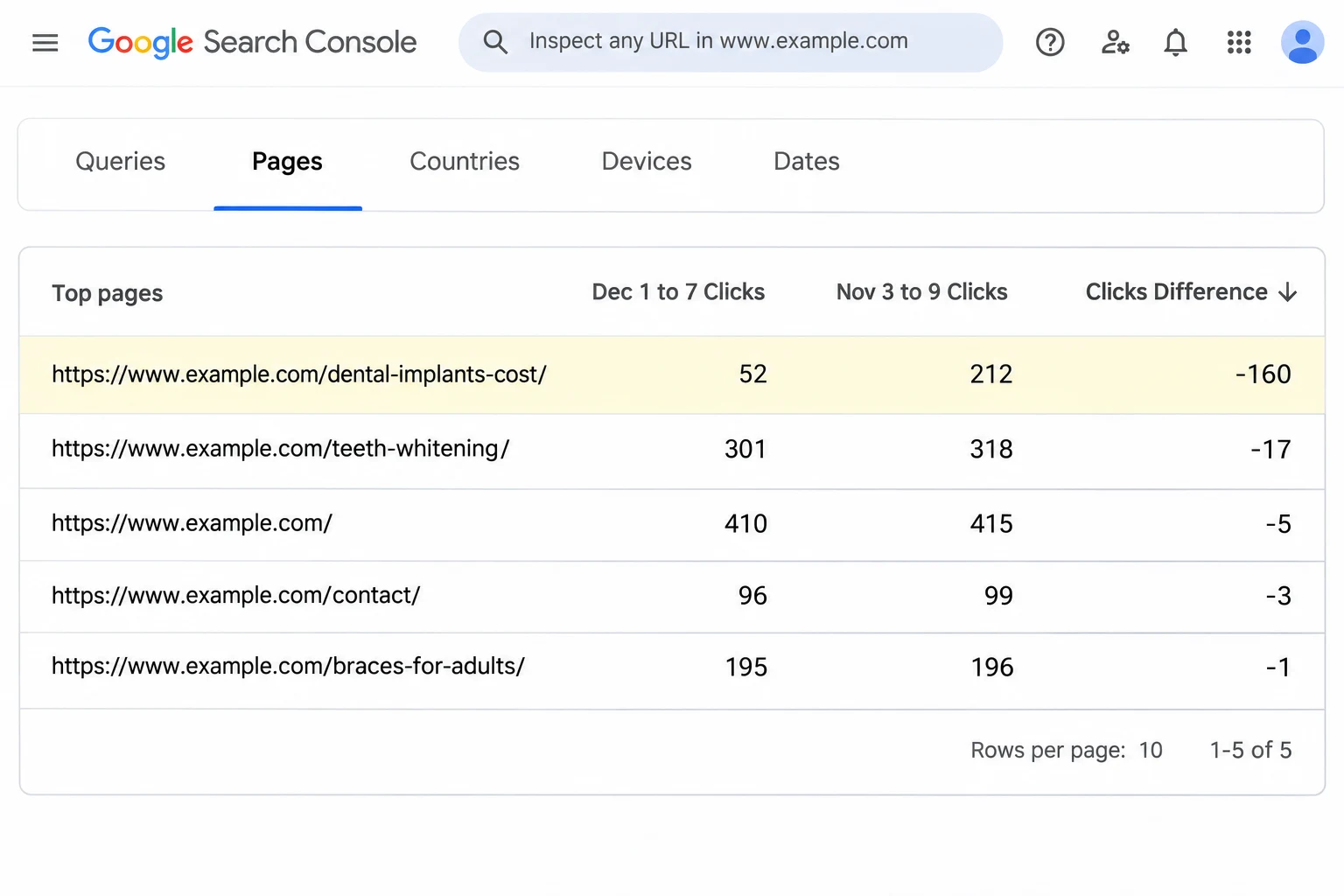
Stay in the comparison view and open the Pages tab. Sort by the difference in clicks so the biggest losers sit at the top. Pick the top five and click into each one to see its queries. Note the average position before and after. You’re looking for a pattern: is it one page, one topic, or everything?
Minutes 13 to 15: look at the results page yourself
Search your two most valuable queries in a private window, the way a customer would. What sits where you used to be? A bigger brand, a forum thread, a fresh guide, an AI Overview, more ads? If your position held but your clicks dropped, the page layout changed, not your ranking. That needs a different fix, and our guide on getting cited in Google AI Overviews covers it.
Small drop or big drop after a Google core update?
This is the part most guides skip, and it decides everything. Google gives two examples in its core update documentation. A small drop, such as position 2 to position 4, generally doesn’t call for drastic action, and Google says to avoid changing content that already does well. A big drop, such as position 4 to position 29, deserves a deeper look at the whole site.
| What you see | Example | What it usually means | What to do |
|---|---|---|---|
| Small dip | Position 2 to 4 | Normal reshuffle, other pages improved | Leave the content alone and keep watching |
| Big drop on a few pages | Position 4 to 29 on 3 or 4 pages | Those pages now serve searchers worse than the new results | Review those pages against Google’s self-assessment questions |
| Big drop across the site | Most pages fall 10 or more spots | A sitewide quality or trust problem | Assess the whole site, then consider an audit |
| Clicks down, position steady | Position 3 to 3, clicks down 30% | The results page layout changed | Work on AI Overview and snippet visibility |
The first two rows come straight from Google’s examples. The third and fourth rows are our own rule of thumb, so treat them as a starting point.
WORKED EXAMPLE
A dental clinic site, one week before and one week after
Step 1. Week before the update, November 3 to 9: 1,240 clicks and 41,000 impressions.
Step 2. Say the rollout ends by November 24, so the clinic checks December 1 to 7: 1,054 clicks and 39,800 impressions. Clicks changed by (1,054 minus 1,240) divided by 1,240, which is a 15% drop. Impressions fell about 3%.
Step 3. The Pages tab shows two very different stories. The teeth whitening page moved from position 3.2 to 3.9, a small dip. The dental implants cost page fell from position 5.1 to 21.4 and lost 160 clicks.
Step 4. The site lost 186 clicks in total, and 160 of them came from one page. That’s 86% of the loss. The clinic should improve the implants page and leave the rest of the site alone.
That’s the whole point of the exercise. A 15% drop sounds scary on a dashboard. Most of the time it comes from a handful of pages, and you can fix those calmly.
Why Black Friday will distort your numbers
Google’s method compares the week after the update with the week before it. This time, the week after will probably include US Thanksgiving, Black Friday and Cyber Monday. For a store, traffic should jump that week anyway, which can hide a real ranking loss. For many service and B2B businesses, the same week can look quieter than normal, which can make a harmless update look like a disaster.
So add a second comparison. Compare the same week with the same week last year, and look at impressions and average position as well as clicks. Position doesn’t care about holiday shopping. If your position held and only clicks moved, the holiday is the likely cause. Stores should also filter out sale-related queries and check product and category pages on their own. On a big catalog that gets fiddly, and it’s one of the first things we look at in ecommerce SEO work.
Want a second pair of eyes before you change anything?
We’ll go through your Search Console data with you and give you a short, plain list: leave it, watch it, or fix it.
What not to do while the update is still rolling out
Panic causes more damage than most core updates. These are the moves we see most often, and we’d avoid every one of them until the rollout is complete:
- Redesigning or migrating the site. You add a second big change and can no longer tell which one moved your rankings.
- Deleting pages that lost traffic. Google calls deleting content a last resort, and removing large sections can look like you built them for search engines.
- Rewriting every title and meta description at once. If something works, you’ll never know which change did it.
- Stripping out page elements because someone online said they hurt SEO. Google warns against exactly these quick fixes.
- Buying links or a recovery package that promises your rankings back by a date. Nobody can promise that.
- Judging your SEO team after one week. A rollout that’s still running tells you very little about their work.
If the drop is real: a 30 to 90 day plan
Say the rollout has finished, you waited a week and the numbers still show a big drop. Here is the order we’d work in.
- Read Google’s self-assessment questions for helpful, reliable content and apply them to the whole site, not just one page. Google also suggests asking someone who doesn’t work on the site to rate it honestly.
- Start with the pages that lost the most clicks. Put each one next to the pages that now outrank it and note what they offer that yours doesn’t: real prices, first-hand photos, newer information, a clearer answer near the top. Our on-page SEO guide walks through the page-level basics.
- Fix technical problems that hold those pages back. Run them through our technical SEO checklist, or get a quick scan with the free MyToolStudio site audit tool.
- If you’re a local business, check your Google Business Profile calls and direction requests separately. The map results use local ranking signals, so don’t blame the core update for everything. Our local SEO services page explains what we review.
- Measure monthly, not daily. Google says some changes show within days, but it can take several months for its systems to recognise lasting improvements. Sometimes the recovery only shows at the next core update.
Low-traffic sites: what to do when Search Console has too little data
Weekly comparisons are noisy when your site gets very few clicks. If you see fewer than about 100 clicks a week, a swing of 20 clicks means almost nothing. Honestly, that’s most small business sites, and most guides ignore them.
Use longer windows instead. Compare 28 days before November 10 with 28 days after the rollout ends. Keep a short list of your 10 most valuable searches and check them in a private window once a week. Watch leads, calls and form fills in Google Analytics, because they matter more than visits. And look at Bing Webmaster Tools as a control. If your Bing traffic dropped in the same week, the cause is probably not Google’s update.
Is it worth paying for help after a core update?
Sometimes, not always. If you have a small dip, you don’t need anyone. Keep publishing useful pages and check again next month. If you have a big drop on a few pages, a good in-house marketer can often fix it with the plan above.
If most of the site dropped and organic search brings in real revenue, an outside review usually pays for itself, because guessing wrong costs more than a few weeks of fees. Our breakdown of technical SEO audit costs shows what a proper audit should include, so you can compare quotes. If you want us to look, our SEO services start with your Search Console data, an itemized quote before any work begins, and the same senior people doing the analysis. The technical SEO side covers crawling, indexing and site speed. You can also see our work before you decide.
FAQ
When did the November 2026 core update start?
Google released it on November 10, 2026, and said the rollout may take up to two weeks. It applies globally and in all languages. Check the Google Search Status Dashboard for the official end date.
How long should I wait before judging the impact?
Google recommends waiting at least a full week after the update finishes rolling out. Then compare that week with the week before the rollout started. Anything you see during the rollout is provisional.
Is a core update the same as a Google penalty?
No. A core update is a broad change to how Google ranks pages, and it doesn’t target specific sites. A penalty, called a manual action, shows up as a notice in Search Console under Security and Manual Actions.
Why did my Search Console AI report show fewer impressions from November 9 to 11?
Google confirmed a logging error in the Generative AI performance report for those dates. It affected the reported data only, not your actual visibility in Google Search, so leave those three days out of your comparisons.
Should I delete pages that lost traffic after the update?
Usually not. Google describes deleting content as a last resort. Improving the pages that lost the most clicks is almost always the better move, and deleting large sections can send the wrong signal.
How long does core update recovery take?
Some improvements show within days, but Google says it can take several months for its systems to recognise that a site is consistently helpful. Sometimes the recovery only appears after the next core update, so measure monthly.
Does a core update affect my Google Business Profile ranking?
Core updates change the regular web results. The map pack runs on local ranking signals such as relevance, distance and prominence, so check your profile’s calls and direction requests separately before you blame the update.
Rankings moved and you want a straight answer?
Tell us your site and what changed. We’ll reply with what the data shows and whether it’s worth fixing now or waiting a few weeks.
About the author: Gaurav Gajjar is the founder of GAP3. He has built WordPress and Shopify websites and run SEO campaigns since 2015, for businesses in India, the USA, the UK, the UAE and Kenya. Connect with him on LinkedIn.
Gaurav Gajjar is the founder of GAP3 Studio in Ahmedabad, India. He has built websites since 2015, at Vibidsoft and Myriad Solutionz and then as a Senior Web Designer at E2M, before starting GAP3 in July 2025. With his team he has delivered more than 140 projects on WordPress, WooCommerce, Shopify and Webflow, and he built WBIZ and MyToolStudio. He writes about WordPress, ecommerce and technical SEO. Connect with Gaurav Gajjar on LinkedIn.