SHORT ANSWER
Clicks with no leads almost always trace back to one of four things. Tracking misses leads that really came in, you pay for searches with the wrong intent, the landing page doesn’t match the ad, or nobody qualifies and calls back. Check them in that order. WordStream’s 2026 benchmarks put the median search conversion rate at 8.18%, so 100 clicks and zero leads deserves a hard look.
The dashboard looks busy. You had 600 clicks this month, a click through rate your account rep called healthy, and a phone that barely rang. Google Ads clicks but no leads is one of the complaints we hear most from founders who run lead generation businesses. It’s rarely a mystery once someone opens the account and looks.
The fix is almost never to spend more. Clicks and leads fail for different reasons, and most of those reasons sit outside the ad itself: in the tracking, in the searches you pay for, on the landing page, or in what happens after a form lands in somebody’s inbox. Below you’ll find the order we check things in, a worked example that turns a nice looking $100 cost per lead into the real number, and an honest section on when ads are the wrong tool.
Who is writing this? We’re GAP3, a web and digital marketing agency in Ahmedabad, India. We run Google Ads for clients and also build the landing pages those ads point to, so yes, we lean toward fixing the page. We’ll say so when that bias shows.
Paying for clicks that go nowhere?
Tell us your monthly spend and what a good lead looks like for you. We reply within one business day with what we’d check first, plus a fixed, itemized quote if you want us to do the work.
Google Ads clicks but no leads: three different problems
Before you touch a single bid, work out which problem you actually have. On the Google Ads overview page they look identical. The fixes point in opposite directions.
Problem one is leads that exist but aren’t counted. The phone rings, forms reach your inbox, and Google Ads still shows zero conversions. Problem two is real silence, where nobody gets in touch at all. Problem three is sneakier. Leads arrive and Google counts them, but your sales team calls them junk, so it feels like nothing is coming in.
| What you see | What it usually means | Check this first |
|---|---|---|
| Clicks, zero conversions in Google Ads, but the phone does ring | Tracking is broken or missing | Submit a test form and make a test call |
| Clicks and truly no enquiries anywhere | Wrong search intent or a weak landing page | Search terms report, then the page on a phone |
| Cheap clicks, high click through rate, nothing else | Bidding for clicks, or ads on Display and Search partners | Bid strategy and network settings |
| Plenty of leads, sales says they are junk | The account optimizes for form fills, not buyers | Your definition of a qualified lead and the form |
| Leads were fine last month, gone this month | A site change broke a form, tag or phone number | Change history in Google Ads and on the site |
| Fewer than 100 clicks so far | Too early to judge | Wait, and check tracking in the meantime |
Step one: make sure leads are really missing
We start here every time, because it’s the cheapest problem to fix. Tracking breaks quietly. Someone updates the form plugin, the thank you page moves, a new phone number goes on the site, and the conversion tag stops firing. The ads keep running while the dashboard reads zero.
You can check most of it yourself in fifteen minutes.
- Fill in every form on the landing page from your phone, with a real email. Make sure it reaches the inbox or CRM, and that Google Ads records a conversion within a day.
- Call the number in the ad and the number on the page. Is each one tracked? Does the call reach a person who answers?
- Open the conversions list under Goals in Google Ads and read what counts as a primary conversion. If a page view or a scroll is on that list, your lead numbers are made up.
- Put last month’s leads from the CRM next to the conversions Google Ads reports. They won’t match perfectly. They should be close.
That third check matters more than people expect. Google’s bidding learns from whatever you tell it counts as success. Tell it a visit to the contact page is a lead, and it will happily go and find you more people who visit contact pages. Some are job seekers. Some are salespeople trying to sell you SEO.
Leads that vanished overnight usually line up with a site update or a settings change, not a sudden shift in your market. So open the change history before anything else.
Your bid strategy may be buying clicks, not customers
Google describes Maximize clicks as a strategy that sets your bids to help get as many clicks as possible within your budget. That’s exactly what it does. It has no idea whether any of those people ever call you.
Plenty of new accounts start on Maximize clicks because there’s no conversion data yet. For a few weeks, fine. Leaving it on for six months is how you end up with 600 cheap clicks and nothing to show for them. Cheap clicks are often cheap for a reason.
Two settings cause similar damage. Search campaigns often go live with the Display Network and Search partners switched on, which puts your ad on websites and partner search pages where people are browsing rather than buying. On a small lead generation budget we’d switch both off until core search works, then test them on purpose.
Once tracking is trustworthy and real conversions come in steadily, move to a conversion based strategy such as Maximize conversions or target CPA. Then double check that the conversion it chases is a lead you would actually pay for.
The search terms don’t match what you sell
Keywords are what you bid on. Search terms are what people typed. With broad match and Google’s AI matching, the gap between the two can be wide, and it’s where most of the wasted money in lead generation accounts hides.
Open the search terms report and sort by cost. Google says it shows terms that a significant number of people used, and it leaves out some low volume searches for privacy reasons, so you won’t see every cent. You’ll see enough. Read the top 50 terms and ask one thing of each: would I be glad to pay for this person to call me?
Here’s what that review tends to turn up for a roofing company.
| Search term (example) | What the person wants | What to do |
|---|---|---|
| roofing jobs near me | A job, not a roof | Add jobs, hiring and salary as negatives |
| how to fix a roof leak yourself | A free DIY answer | Add yourself and DIY as negatives |
| roof shingles home depot | Materials to buy | Add store names as negatives |
| roofing certification course | Training | Add course and certification as negatives |
| roofing company tampa reviews | Comparing local contractors | Keep it, and show reviews on the page |
| emergency roof leak repair tampa | Help today | Keep it, bid higher, send it to a repair page |
Think in patterns, not single terms. Words like jobs, salary, course, free and DIY block a whole family of searches at once. Go easy on blunt negatives like how to, though. Someone searching how to get a roof replaced fast can be a perfectly good buyer.
Location belongs in this step too. The default location option can show ads to people who have only shown interest in your area. For a local service business, pick the option that targets people in, or regularly in, your locations.
The landing page loses people after the click
Say the search terms are clean. Someone typed emergency roof leak repair tampa, clicked, and landed on your homepage. There’s a slider about company values and a menu of nine services. They leave, and you paid for the visit.
Paid traffic needs a page that picks up the searcher’s exact thought. One page per service, a headline that repeats the search, a phone number visible without scrolling, and a form short enough to finish in a parking lot.
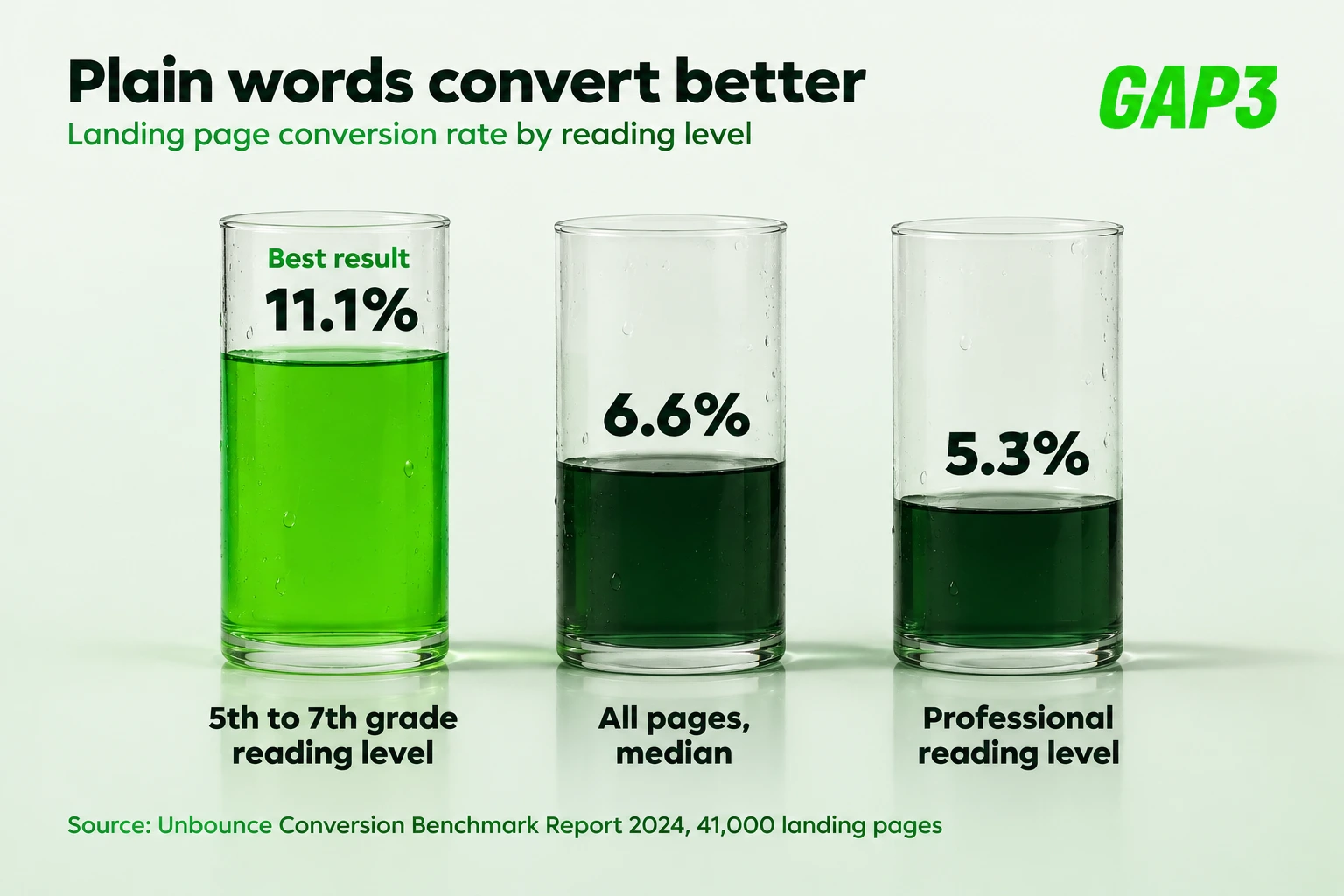
Unbounce studied more than 41,000 landing pages for its 2024 Conversion Benchmark Report and found a median conversion rate of 6.6% across industries. The finding we use more often is about wording. Pages written at a 5th to 7th grade reading level converted at 11.1%, compared with 5.3% for pages written at a professional level. Plain words roughly doubled the result.
Speed counts as well, since a big share of local searches happen on phones. Open your landing page on your own phone using cellular data, not the office wifi. If you’re waiting, so is every paying visitor. Our free mobile responsive checker on MyToolStudio shows how the layout holds up at different screen widths before you pay for another click. When the page itself is the weak link, a dedicated landing page design or some WordPress speed optimization will usually do more than any bid change.
On forms: each extra field costs a few leads, but one qualifying question, such as when do you need this done, mostly filters out junk. We take that trade nearly every time.
The math that matters: cost per qualified lead
Most reports stop at cost per lead, and that number can look perfectly healthy while the business loses money. WordStream’s 2026 Google Ads benchmarks, based on 13,474 US search campaigns, put the median cost per click at $5.42, the median conversion rate at 8.18% and the median cost per lead at $66.69. Home and home improvement ran higher, at $90.92 per lead. Keep those numbers in mind for the example below.
WORKED EXAMPLE: A ROOFING COMPANY IN TAMPA SPENDING $3,000 A MONTH
This account is made up, but we see its twin all the time. The owner thinks the ads are fine. Sales thinks they’re useless. Both are partly right.
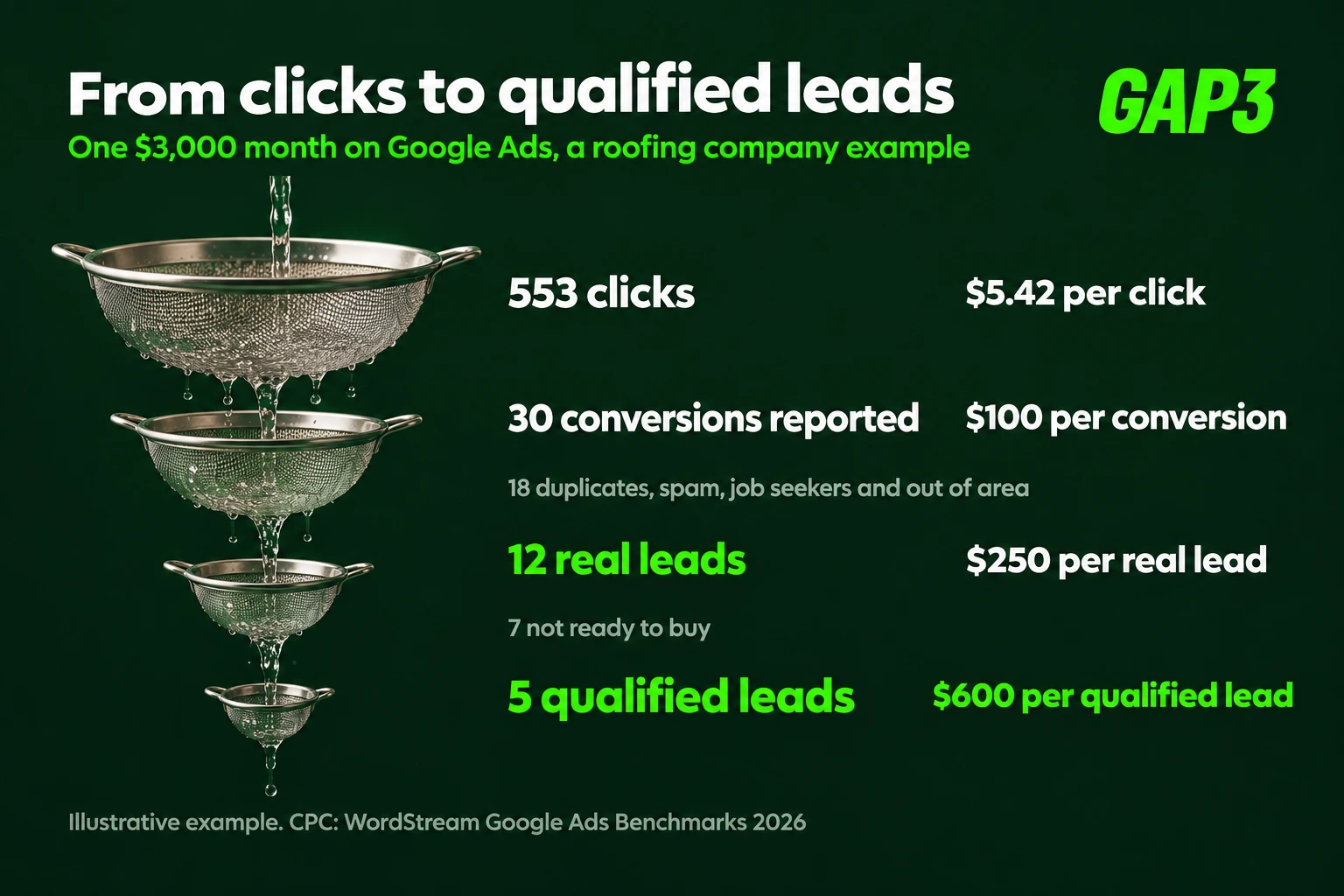
Step 1. $3,000 at a $5.42 cost per click buys about 553 clicks.
Step 2. Google Ads reports 30 conversions. $3,000 divided by 30 is $100 a lead, close enough to the $90.92 home improvement median that nobody panics.
Step 3. We read all 30 in the CRM. 7 are duplicates or spam, 5 are job seekers and suppliers, and 6 are outside the service area or want work the company doesn’t do. That leaves 12 real leads, so $3,000 divided by 12 is $250 each.
Step 4. Sales rings all 12. Only 5 turn out to be homeowners in the area who want work done within three months. Divide $3,000 by 5 and you get $600 per qualified lead.
So the real number is $600, six times what the dashboard shows. If a replacement job is worth $12,000 and sales closes 2 of those 5, that might still be a fine deal. If the average job is $900, it’s a disaster. You need both numbers to know which.
Suppose the fixes above cut the junk, and that same $3,000 now lands 12 good leads, up from 5. Your cost per qualified lead drops to $250. We made those numbers up to show the idea, so please don’t read them as a forecast. The point stands, though. The upside sits inside the budget you already spend, not in a bigger one.
For how ad spend and management fees split, our breakdown of Google Ads management cost walks through it.
Sometimes there just aren’t enough clicks yet
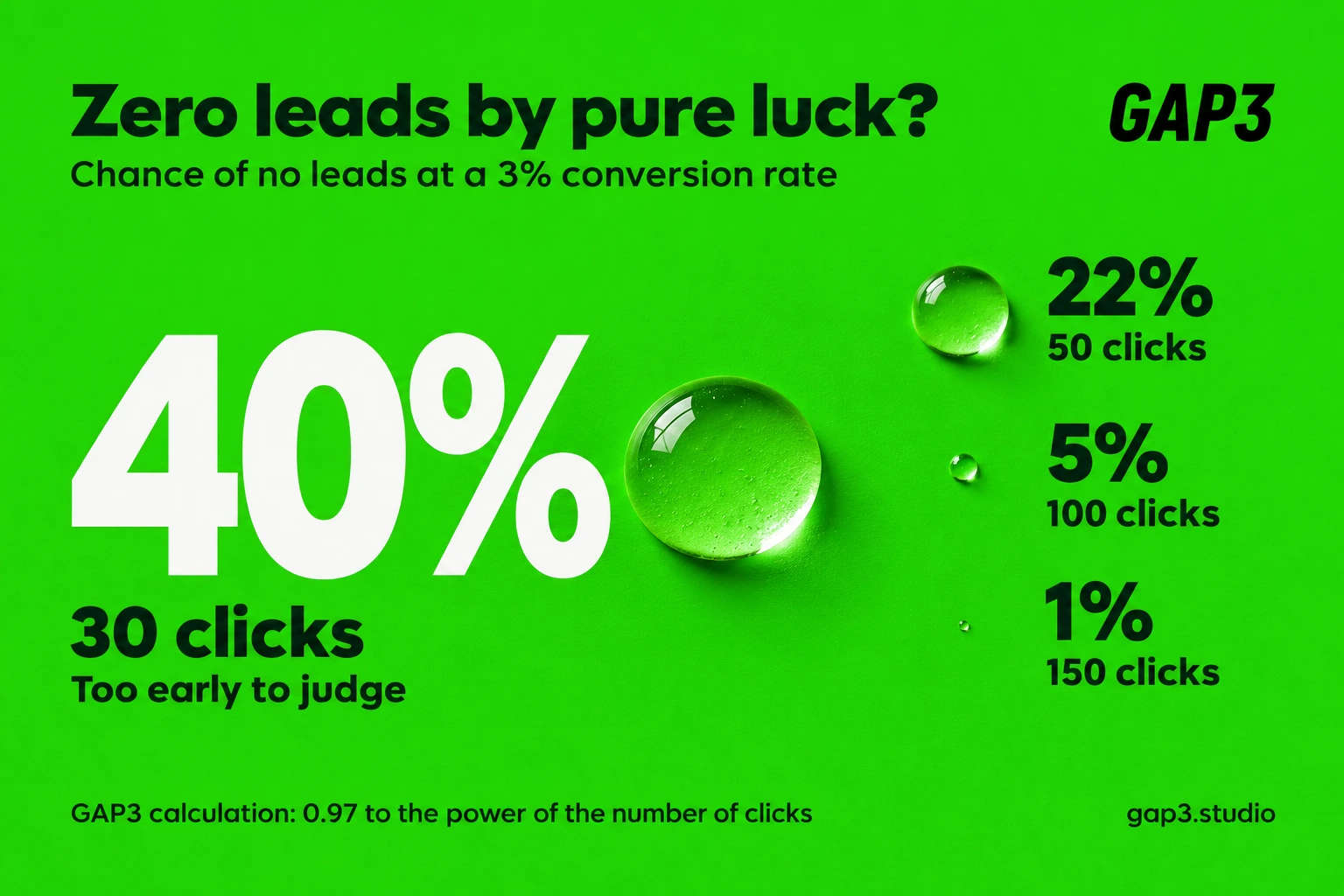
Now and then nothing is broken. The campaign is simply young. Clicks behave a lot like coin flips. Say your true conversion rate is 3%, which is normal for a B2B service with a long sales cycle. The chance that 30 clicks bring zero leads is 0.97 multiplied by itself 30 times, which works out to about 40%. At 50 clicks it’s about 22%. At 100 clicks, about 5%. At 150 clicks, about 1%.
So 30 clicks and no leads tells you very little, while 150 clicks and no leads is telling you something. Give keywords a few hundred clicks before you judge them, and use the wait to check search terms and tracking, which you can judge on day one.
Want someone to run this math on your account?
Send your monthly spend, your service area and what a qualified lead means for your business. We come back within one business day with the checks we’d run first and a fixed, itemized quote in US dollars.
Leads arrive, but nobody qualifies them or calls back
This part is about your office, not Google. A form comes in at 4:40 pm on a Friday. Someone sees it Monday morning. By then the homeowner has booked whoever picked up the phone first. In the ads report that counts as a lead. In your bank account it counts as nothing.
Two habits fix most of it. Get your team to agree, on paper, what makes a lead worth chasing. For a roofer that might be zip code, roof type and when they want the job done. Then somebody in sales goes through the CRM every Friday and tags each lead as qualified, unqualified or won. Yes, every single one.
Then close the loop, so Google Ads learns from what happens after the form. Google’s help pages describe enhanced conversions for leads as an easier alternative to the older offline conversion import, with more accurate reporting. Once qualified outcomes flow back into the account, bidding can chase people who resemble your real customers instead of people who enjoy filling in forms. Connecting a CRM this way is usually a small API integration job, and it’s one of the most valuable fixes in any lead generation account.
What about click fraud? Every owner with bad results asks eventually whether competitors are clicking the ads. It does happen, just less than people fear. Google says that when it identifies invalid traffic before the end of the billing cycle, you don’t pay for it. We check the boring causes first, because they’re far more common.
Red flags in how your account is run
If an agency or freelancer runs your ads, check these whatever the results look like.
- The monthly report leads with impressions, clicks and click through rate, and never mentions calls, qualified leads or revenue.
- The campaign has sat on Maximize clicks for months with no plan to move off it.
- Primary conversions include page views, scrolls or button clicks that aren’t real enquiries.
- Every ad sends people to your homepage.
- Nobody has added a negative keyword in the past month.
- You don’t have admin access to your own Google Ads account, or it’s registered under the agency’s name.
- The answer to weak results is always a bigger budget.
None of these prove bad intent. They do suggest nobody is watching the part of the account that turns clicks into money. Comparing providers? Our guide to digital marketing agency pricing in the USA shows which pricing models reward that attention.
A 30 day plan to find the leak
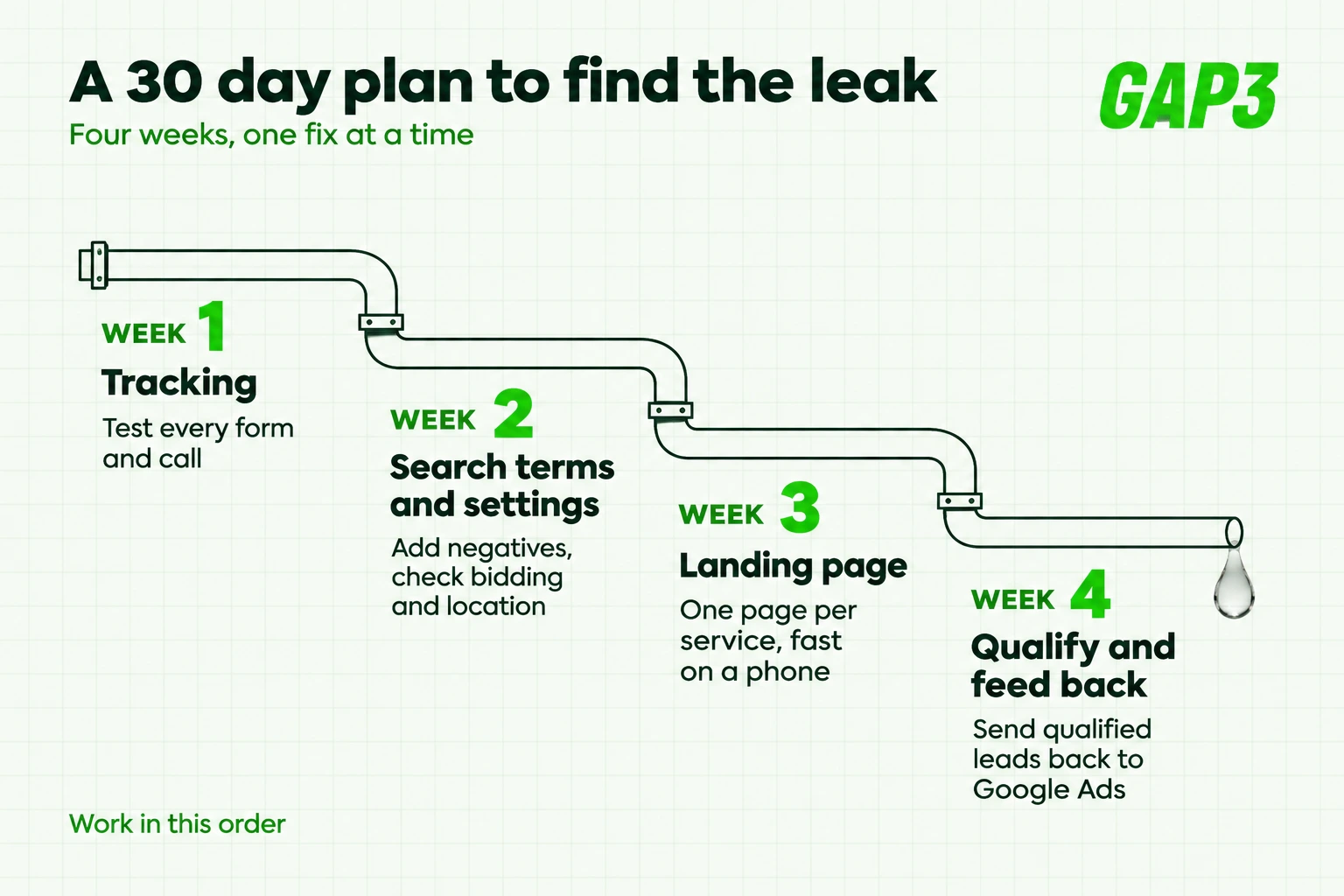
Here’s the order we work in. It fits into a month, and you don’t have to pause anything.
| Week | What to do | You are done when |
|---|---|---|
| Week 1: tracking | Test every form and call path, clean up primary conversions, compare Google Ads with the CRM | Every test lead shows up in both places |
| Week 2: search terms and settings | Review the top 50 terms by cost, add negative patterns, check networks, location and bid strategy | Every costly term is one you’d pay for again |
| Week 3: landing page | One page per service, headline that matches the search, fast on a phone, short form with one qualifying question | A stranger can call or enquire within 10 seconds |
| Week 4: qualify and feed back | Label every lead in the CRM, send qualified outcomes back to Google Ads, track cost per qualified lead | You know your cost per qualified lead |
Stick to the order. Rewriting ads before tracking works means judging new ads with broken numbers.
When Google Ads isn’t the right fix
We run ads for clients, so this may sound odd. Sometimes the honest answer is to stop.
If your budget is a few hundred dollars a month where clicks cost $10 or more, you’ll never collect enough data to learn anything. If nobody answers the phone during working hours, ads just fill a voicemail box. And if very few people search for what you sell, search ads have almost nothing to work with.
In those cases we’d put the money into the website, the offer or SEO first, and come back to paid search once the basics hold. Clients in the US, the UK and India hear this from us more often than you’d guess.
If you do want help, here’s how we work. The same senior team that scopes the job does the work. You get a fixed, itemized quote and a demo every week, and US clients are billed in dollars with calls in an EST or PST overlap window. We’ve delivered more than 140 projects over nine years and hold a 5.0 rating from more than 40 Google reviews. Have a look at our recent projects before you decide.
Frequently asked questions
Why am I getting Google Ads clicks but no leads?
Most of the time we find one of four culprits: tracking that quietly broke, searches from people who were never going to buy, a page that has nothing to do with the ad, or leads nobody phoned back in time. Start with tracking. It takes ten minutes to test, and sometimes that turns out to be the entire problem. After that, sort the search terms report by cost and read it.
How many clicks should it take to get a lead?
It depends on your conversion rate. WordStream’s 2026 median for search campaigns is 8.18%, so roughly one lead every 12 clicks. A B2B service converting at 3% needs about 33 clicks per lead, and even 30 clicks with no lead has about a 40% chance of happening by luck.
Are competitors clicking my ads?
It happens, but far less often than most owners suspect. Google says that invalid traffic it identifies before the end of the billing cycle is not charged to you. Look at tracking, search terms and the landing page before you blame click fraud.
Should I stop using Maximize clicks?
It’s fine for the first few weeks while you collect data. Once tracking works and you have steady real conversions, switch to a conversion based strategy such as Maximize conversions or target CPA. Staying on Maximize clicks for months tends to buy cheap traffic that rarely calls.
What is a qualified lead in Google Ads?
It’s a lead that matches your own definition of a real buyer, such as the right location, the right service, a realistic budget and a near term need. Google can’t know that on its own. Your sales team marks it in the CRM, and you send that outcome back to Google Ads.
Can Google Ads optimize for qualified leads instead of form fills?
Yes, if you give it the data. Enhanced conversions for leads, or the older offline conversion import, lets you send qualified or won outcomes from your CRM back into Google Ads. Bidding can then aim for people who look like your real customers.
Get a straight answer on your Google Ads
Send your monthly spend and a sentence on what a good lead looks like. We reply within one business day with what we’d check first and a fixed, itemized quote. USD billing for US clients, and calls in your time zone.
Gaurav Gajjar is the founder of GAP3 Studio in Ahmedabad, India. He has built websites since 2015, at Vibidsoft and Myriad Solutionz and then as a Senior Web Designer at E2M, before starting GAP3 in July 2025. With his team he has delivered more than 140 projects on WordPress, WooCommerce, Shopify and Webflow, and he built WBIZ and MyToolStudio. He writes about WordPress, ecommerce and technical SEO. Connect with Gaurav Gajjar on LinkedIn.